
Author: CyberDudeBivash
Powered by: CyberDudeBivash Brand | cyberdudebivash.com
Related:cyberbivash.blogspot.com
Daily Threat Intel by CyberDudeBivash
Zero-days, exploit breakdowns, IOCs, detection rules & mitigation playbooks.
Follow on LinkedInApps & Security Tools Contact: iambivash@cyberdudebivash.com | http://www.cyberdudebivash.com | cyberdudebivash pvt ltd |
Section 1: Introduction
Malware analysis isn’t just a skill—it’s a frontline defense in a world where attacks evolve faster than protections. By 2026, expect 80% of threats to leverage AI for polymorphism. This playbook equips you to dissect any sample, from basic trojans to nation-state APTs, using a hybrid human-AI methodology.
Section 2: Lab Setup
Start with isolation: Use VMware or VirtualBox for a detachable network. Install REMnux (Linux-based) for static tools and Cuckoo Sandbox for automated dynamic runs. Pro Tip: Integrate GPT-4o or similar LLMs via APIs for initial hash queries—save hours on triage.
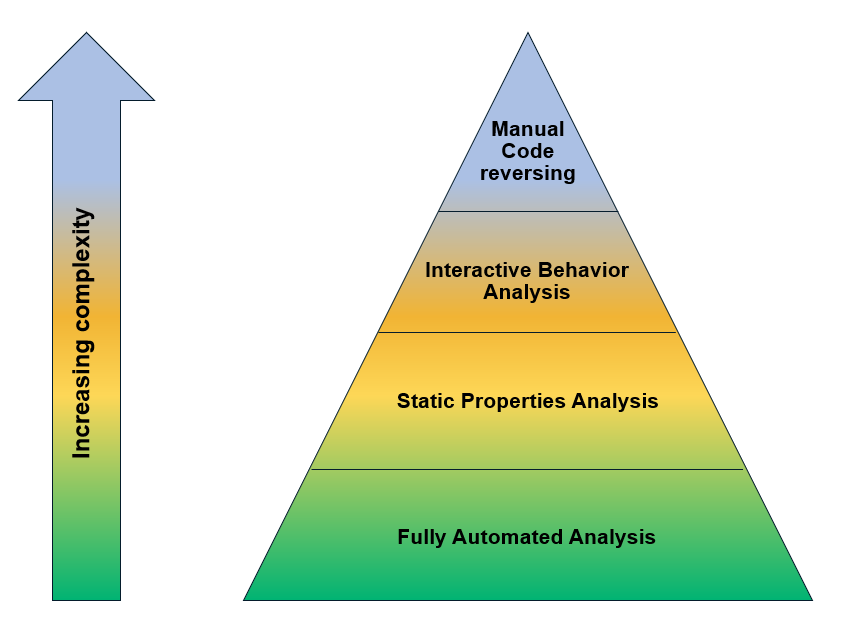
Intro to Malware Analysis: What It Is & How It Works – InfoSec …
(Above: A standard malware analysis process diagram to visualize your workflow.)
Section 3: Initial Triage
Step 1: Hash and Check Known Threats Use PowerShell: Get-FileHash -Algorithm SHA256 sample.exe. Upload to VirusTotal—if it’s known (e.g., matches Zeus banker), reference existing reports. If not, proceed. Step 2: Strings and Imports Extract with strings.exe or BinText. Look for C2 URLs, registry keys. Imports like CreateProcessA signal injection; IsDebuggerPresent means anti-analysis—bypass with ScyllaHide plugin. Lab: Analyze a packed DLL (high entropy >7.5)—unpack manually via memory dump in x64dbg.
Section 4: Dynamic Analysis
Run in a sandbox: Monitor with ProcMon for file/registry changes, Wireshark for network traffic. Detect behaviors like persistence (e.g., Run key edits). Overcome anti-VM: Patch checks in code or use bare-metal if needed. Example: For a bootkit, capture boot process with Volatility for memory forensics.

Process flowchart of the malware analysis process during the …
(Above: Flowchart of the analysis experiment process.)
Section 5:Reverse Engineering Mastery
Code disassembly and decompilationWindows internals, shellcode analysis, C++/64-bit specifics. Hands-on with real samples (e.g., ransomware decryption).
Section 6: Incident Response
Follow CISA/FRSecure hybrid:
- Preparation: Build CSIRT, secure backups, deploy EDR (e.g., CrowdStrike).
- Identification: Use SIEM for alerts; triage with IOCs (hashes, domains).
- Containment: Isolate via firewall; block hashes in AV.
- Eradication: Reimage systems, scan for remnants.
- Recovery: Monitor 30+ days; reset creds. Checklist Template: [Downloadable PDF with fillable fields].
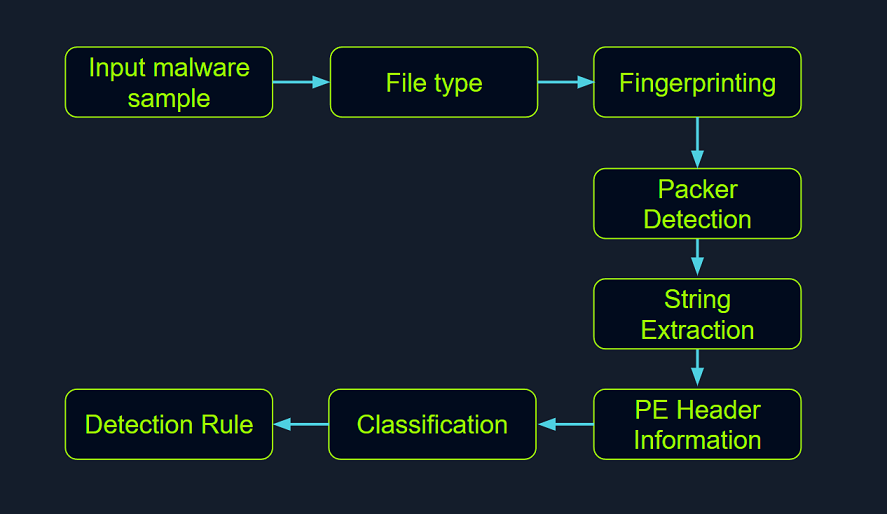
Malware analysis for beginners (step-by-step)
(Above: Step-by-step malware analysis stages.)
Section 7: Advanced
Case Study: Ryuk Ransomware—Trace from Emotet dropper to encryption. Use AI: Train simple ML models (via scikit-learn) on behavioral data for anomaly spotting.
Section 8: Best Practices and Resources
Career tips, updates, appendicesChecklists, certification paths (e.g., GREM), glossary, tool cheat sheets.
Ultimate Malware Analyst Playbook 2026
Mastering Detection, Dissection, and Defense in the AI-Driven Threat Era
Author: CyberDudeBivash Version: 1.0 Date: January 2026
This playbook is the definitive guide for malware analysts in 2026, blending timeless fundamentals with cutting-edge techniques against AI-powered, polymorphic, and fileless threats. Designed for SOC analysts, incident responders, reverse engineers, and cybersecurity professionals.

(Standard malware analysis process flowchart – your roadmap from submission to reporting.)
Section 1: Introduction to Malware Analysis
Malware analysis is the art and science of understanding malicious software to detect, mitigate, and prevent cyber threats. In 2026, the landscape is dominated by AI-assisted attacks: over 20-30% of exploits target network edge devices, fileless and polymorphic malware evades signatures, and AI enables mid-tier actors to launch sophisticated campaigns with automated victim profiling and on-demand variants.
Key trends shaping 2026:
- AI-Powered Malware: Generative AI creates adaptive, self-evolving strains (e.g., PromptLock ransomware using local LLMs).
- Ransomware Evolution: 131% spike in 2025 malware attacks; expect AI-driven deepfakes and triple extortion.
- Supply Chain & MaaS: Industrialized attacks via cracked AI pen-testing tools and Malware-as-a-Service.
- Cross-Platform Threats: Rising mobile (Android/macOS) and IoT malware.
Goals of Analysis:
- Identify indicators of compromise (IOCs).
- Map to MITRE ATT&CK tactics.
- Develop detections and defenses.
Analyst Roles: Triage (quick assessment), static/dynamic reverse engineering, forensics.
Ethical & Legal Considerations: Analyze only in isolated labs. Comply with laws (e.g., no distribution of live malware). Use anonymized samples from reputable sources like MalwareTrafficAnalysis.net or ANY.RUN.
This playbook equips you with a hybrid human-AI approach for mastery.

(MITRE ATT&CK Enterprise matrix – core framework for mapping threats.)
Section 2: Lab Setup and Essential Tools
A safe, isolated lab is non-negotiable. Use virtualization (VirtualBox, VMware, or Proxmox) with host-only networking and snapshots.
Recommended Setup (2026 Standard):
- Host Machine: Dedicated hardware or secure host OS.
- Guest VMs:
- Windows Victim/Analysis: FLARE-VM (Mandiant’s pre-loaded Windows toolkit) on Windows 10/11.
- Linux Analysis: REMnux (Lenny Zeltser’s distro for static/network tools).
- Network Configuration: Host-only adapter + INetSim/FakeNet on REMnux for simulated internet (capture C2 without real outbound).
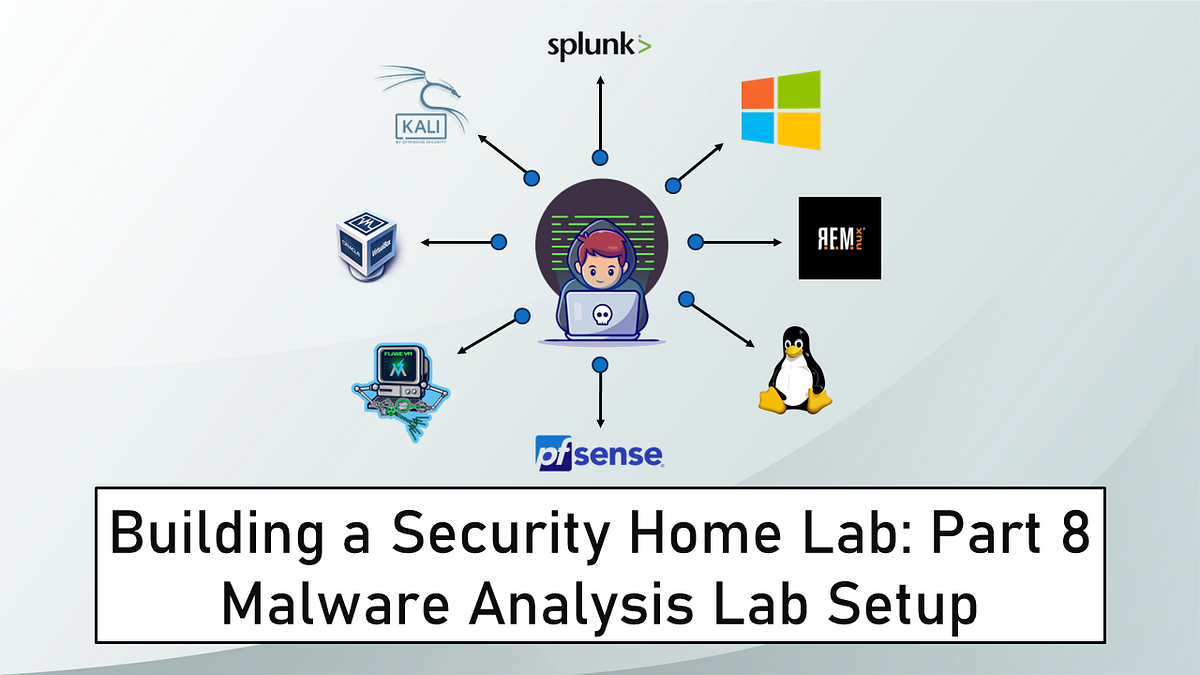
Building a Virtual Security Home Lab: Part 8 – Malware Analysis …
(Typical malware lab with FLARE-VM and REMnux VMs.)
Installation Steps:
- Download FLARE-VM installer script and run in a fresh Windows VM.
- Import REMnux OVA.
- Set REMnux as DNS for Windows VM to route traffic through INetSim.
Top Tools (2026):
- Static: Ghidra (free decompiler), IDA Pro/Free, PEStudio, strings, BinText.
- Dynamic: x64dbg, ProcMon, ProcDot, Wireshark, Sysinternals Suite.
- Sandboxes: Cuckoo Sandbox, ANY.RUN (cloud interactive), Joe Sandbox.
- AI-Enhanced: Intezer Analyze (automated code similarity), Recorded Future Malware Intelligence.
- Others: Volatility (memory forensics), YARA (rule-based scanning).
Snapshot clean states frequently. Use bare-metal for advanced evasion testing if needed.
Section 3: Initial Triage and Static Analysis
Static analysis examines malware without execution – safe and fast for initial indicators.
Workflow:
- Hashing & Reputation Check: Compute MD5/SHA256. Query VirusTotal/Hybrid Analysis.
- File Type Identification: file command (REMnux) or PEiD.
- Strings Extraction: strings -a sample.exe | grep http for C2 URLs.
- PE Header Analysis: PEView or CFF Explorer for imports (e.g., suspicious APIs like WriteProcessMemory).
- Packing/Obfuscation Detection: High entropy (>7.5) indicates packing. Use Detect It Easy (DIE).
- Unpacking: Manual dumps or tools like UPX (if known packer).
Overcoming Evasion: Custom packers? Use entropy scans and manual debugging later.
Lab Example: Analyze a suspicious EXE – extract strings showing registry persistence keys.
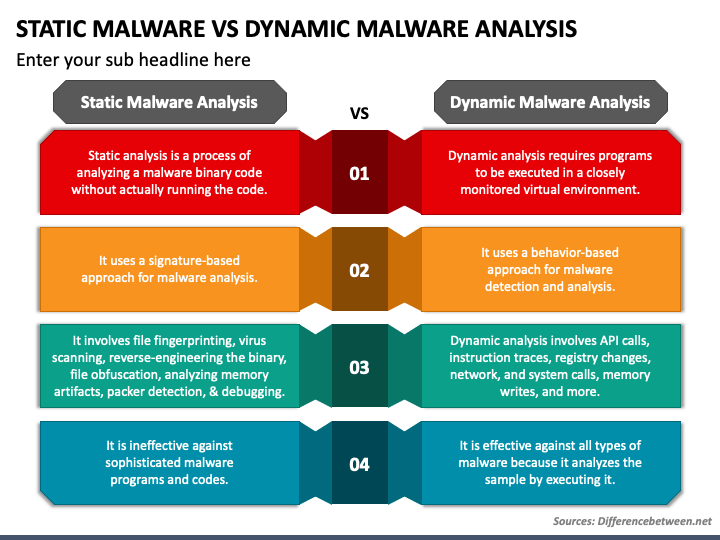
Static Malware Analysis Vs Dynamic Malware Analysis PowerPoint and Google Slides Template
(Static vs. Dynamic analysis comparison.)
Section 4: Dynamic Analysis and Behavioral Monitoring
Execute malware in a controlled environment to observe runtime behavior.
Safe Execution:
- Use sandboxes (ANY.RUN for interactive).
- Monitor with ProcMon (files/registry), RegShot (before/after), Wireshark (network).
Key Observations:
- Process creation/injection.
- Persistence (Run keys, scheduled tasks).
- Network C2 (beacons, exfil).
- Anti-VM checks (bypass with ScyllaHide).
Tools: x64dbg for debugging, API Monitor for hooks.
2026 Tip: AI-driven malware may adapt – run multiple times with varied environments.
Section 5: Reverse Engineering Mastery
Dissect code for deep understanding.
Basics:
- Disassembly: Ghidra/IDA for pseudo-C.
- Debug: Set breakpoints on suspicious APIs.
Advanced:
- Shellcode analysis.
- Control flow graphing.
- Patch anti-debugging.
Windows Internals: Focus on 64-bit, kernel drivers.
Hands-on: Decompile ransomware decryptor logic.
Section 6: Incident Response Playbook for Malware Incidents
Integrate analysis into full IR (NIST/CISA framework).
Phases:
- Preparation: EDR deployment, backups.
- Detection/Identification: Alerts → Triage with IOCs.
- Containment: Isolate hosts, block hashes/domains.
- Eradication: Reimage, remove remnants.
- Recovery: Monitor, patch.
- Lessons Learned: Update detections.
Map to MITRE ATT&CK for TTPs.
Checklist Template: Downloadable (fillable PDF) with IOC tracker.
Section 7: Advanced Topics and Real-World Case Studies
Emerging Threats:
- AI-Generated Malware: Polymorphic variants on-demand.
- Cloud/IoT Attacks.
- Fileless/PowerShell abuses.
Case Studies (Anonymized 2025-2026):
- Ryuk-like Ransomware: From Emotet dropper to encryption.
- AI-Assisted Infostealer: Behavioral evasion.
- Supply Chain Loader (e.g., Gootloader variant).
Defenses: ML anomaly detection, zero-trust.
Section 8: Best Practices, Career Tips, and Resources
Best Practices:
- Document everything (reports with screenshots).
- Stay updated: Follow Krebs, Malwarebytes Labs.
- Hybrid AI-Human: Use tools like Intezer for triage.
Career Path: Certifications (GREM, GCFA). Contribute to open-source (YARA rules).
Resources:
- Books: Practical Malware Analysis (updated editions).
- Sites: REMnux docs, Mandiant FLARE blog.
- Communities: Reddit r/Malware, Malware Unicorn workshops.
Appendices: Tool cheat sheets, glossary, sample report template.
Ultimate Malware Analyst Playbook 2026
Mastering Detection, Dissection, and Defense in the AI-Driven Threat Era
Version: 1.0 Date: January 2026 Author : CyberDudeBivash
Section 1: Introduction to Malware Analysis
Malware analysis is the systematic process of examining malicious software to understand its functionality, origin, behavior, and impact. It empowers defenders to detect threats, develop countermeasures, and attribute attacks—serving as a cornerstone of modern cybersecurity.
As we enter 2026, the cyber threat landscape is defined by an intense AI arms race between attackers and defenders. Malware attacks surged dramatically in 2025, with malware-laden emails increasing over 130% year-over-year, while overall malware incidents reached near-record highs following a temporary decline post-2018. Ransomware, a dominant subset, saw attack volumes spike but ransom payments decline (average dropping to ~$1 million), shifting focus toward data exfiltration and double/triple extortion.
Key Trends Shaping the 2026 Threat Landscape:
- AI-Powered and Autonomous Malware: Attackers increasingly leverage generative AI for polymorphic code, automated vulnerability exploitation, deepfake-enabled social engineering, and even self-adapting “agentic” malware. Predictions warn of a resurgence of fast-spreading AI-fueled worms, with malware capable of real-time evasion, on-demand script generation, and behavioral adaptation.
- Cross-Platform and Emerging Targets: Threats expand beyond Windows to macOS (e.g., GlassWorm campaigns), Android (highest mobile infection rates), IoT, and cloud environments.
- Malware-as-a-Service (MaaS) Professionalization: Lower barriers enable mid-tier actors; new groups and rebranded affiliates proliferate, often blending with geopolitical motives.
- Geopolitical Convergence: Nation-state tactics trickle to cybercriminals, amplifying disruptive attacks on critical infrastructure.

The Top 26 Security Predictions for 2026 (Part 2)
Goals of Malware Analysis:
- Extract Indicators of Compromise (IOCs): Hashes, IPs, domains, behavioral signatures.
- Map behaviors to frameworks like MITRE ATT&CK for TTP (Tactics, Techniques, Procedures) understanding.
- Reverse engineer to uncover capabilities, persistence mechanisms, and C2 infrastructure.
- Inform detection engineering, incident response, and threat hunting.
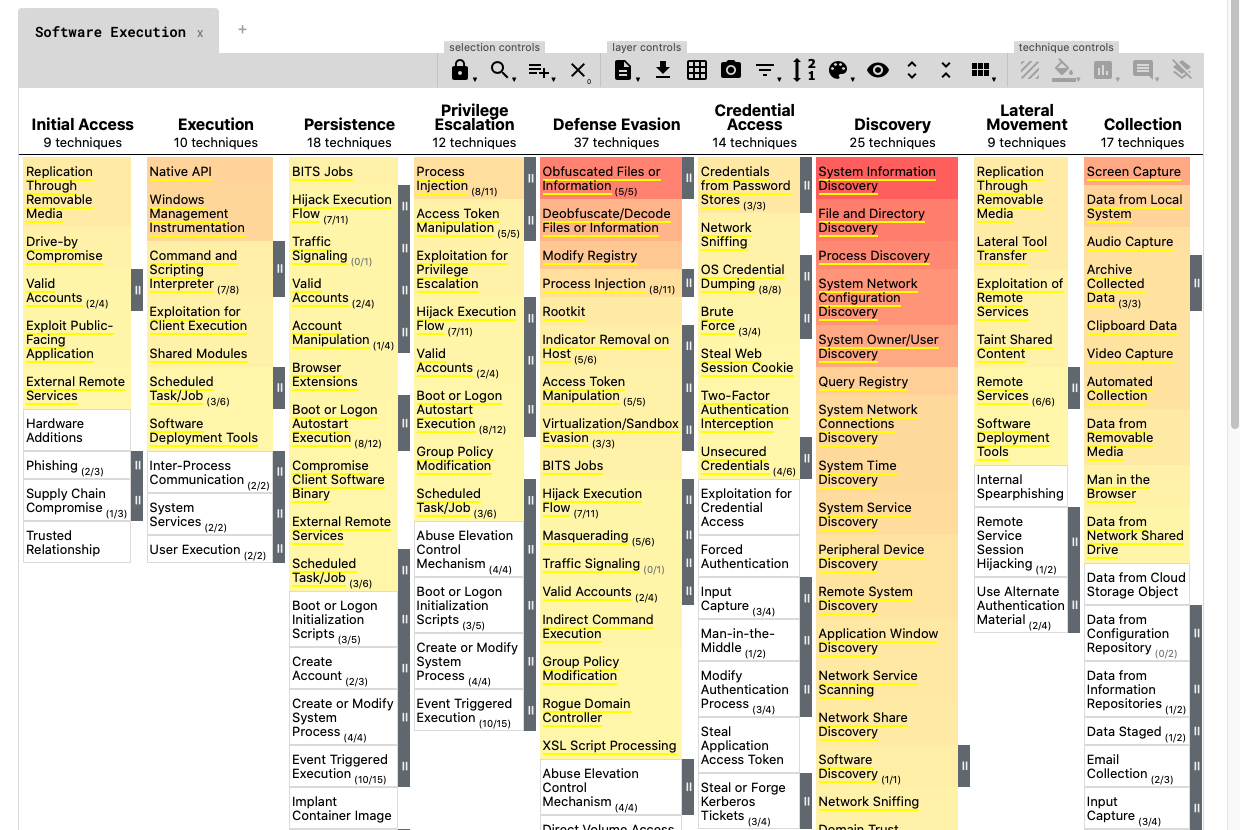
ATT&CK Data & Tools | MITRE ATT&CK®
(MITRE ATT&CK Enterprise matrix – the foundational framework for mapping adversary behaviors.)
Types of Analysis:
- Static: Examine without execution (safe, reveals packing/obfuscation).
- Dynamic: Run in controlled environment (observes runtime behavior).
- Hybrid: Combine both for comprehensive insights.
- Memory Forensics: Analyze RAM dumps for fileless threats.
Analyst Roles and Skill Levels:
- Triage analysts: Rapid assessment via automated tools.
- Reverse engineers: Deep code dissection.
- Threat intelligence specialists: Attribution and context.
Ethical and Legal Considerations:
- Always operate in isolated labs to prevent accidental spread.
- Source samples ethically (e.g., MalwareBazaar, VirusShare, ANY.RUN).
- Comply with local laws; avoid analyzing live C2 or distributing exploits.
- Prioritize safety: Use virtualization with no host network access.
This playbook adopts a hybrid human-AI methodology, leveraging tools like LLMs for initial triage and code explanation while emphasizing rigorous manual verification. In 2026, mastering both traditional techniques and AI-assisted workflows is essential to stay ahead of autonomous threats.

(Standard malware analysis workflow flowchart – your step-by-step roadmap from sample acquisition to reporting.)
Section 2: Lab Setup and Essential Tools
A secure, isolated laboratory environment is the foundation of professional malware analysis. Never analyze malware on your host machine or a production system—always use dedicated, disposable virtual environments to contain risks and prevent accidental infection or data exfiltration.
In 2026, the gold standard remains a hybrid setup combining FLARE-VM (Windows-based for victim simulation and deep reverse engineering) with REMnux (Linux-based for static analysis, network simulation, and forensics). This combination provides comprehensive coverage across static, dynamic, and behavioral analysis phases.
How To Create Your Own Malware Analysis Environment – Kraven Security
(Typical malware analysis lab network architecture with FLARE-VM as the victim machine and REMnux handling network simulation via INetSim.)
Building a Virtual Security Home Lab: Part 8 – Malware Analysis …
(High-level diagram of a secure malware lab setup using virtual machines and isolated networking.)
Recommended Virtualization Platform
- Primary Choice: Oracle VirtualBox (free, robust) or VMware Workstation/Player.
- Advanced: Proxmox VE for bare-metal hypervisors if scaling to multiple labs.
- Enable hardware virtualization (VT-x/AMD-V) in BIOS and allocate sufficient resources (8+ GB RAM per VM, 4+ CPU cores).
Core Lab Components
1. Windows Analysis/Victim VM: FLARE-VM
FLARE-VM, maintained by Mandiant (Google Threat Intelligence), is a pre-configured Windows environment packed with hundreds of reverse engineering and analysis tools. It remains the #1 choice for Windows malware analysis in 2026.
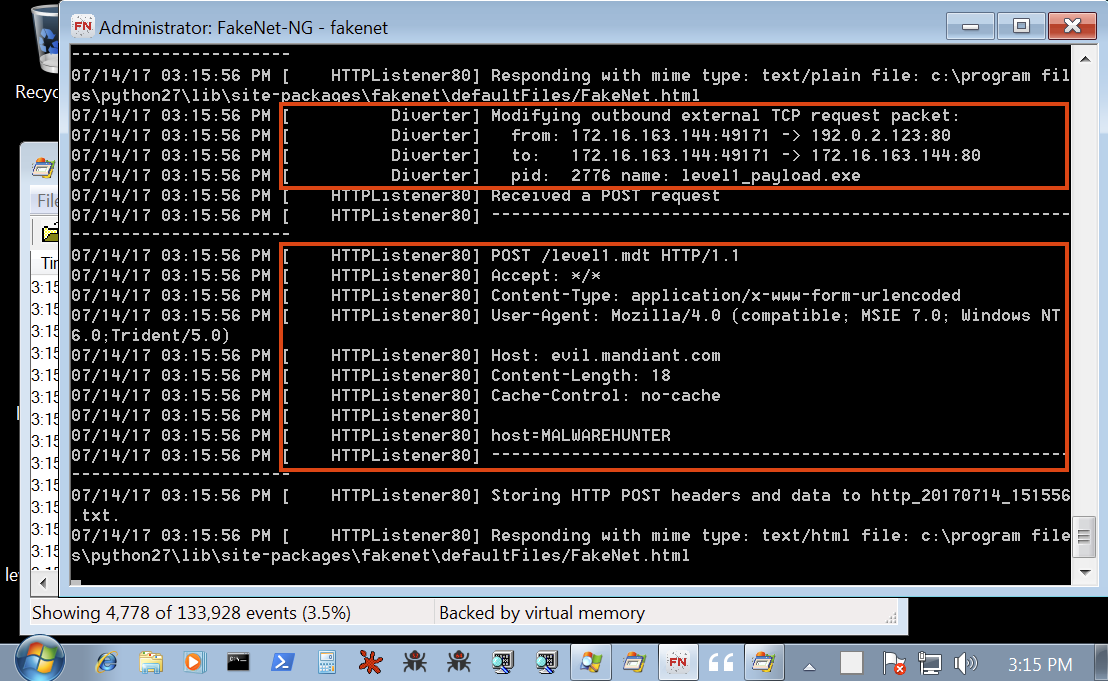
FLARE VM: The Windows Malware Analysis Distribution You’ve Always …
(FLARE-VM desktop showcasing installed tools like x64dbg, IDA, and PEStudio.)
Setup Steps:
- Create a fresh Windows 10/11 (64-bit) VM.
- Take a clean snapshot.
- Disable Windows Defender real-time protection (temporarily, via Group Policy).
- Open PowerShell as Administrator and run:text
Set-ExecutionPolicy Unrestricted -Force iwr -useb https://raw.githubusercontent.com/mandiant/flare-vm/master/install.ps1 | iex - The installer automates everything—expect 1-2 hours for downloads and setup.
- Take a final “clean” snapshot post-installation.
2. Linux Analysis VM: REMnux
REMnux is a Ubuntu-based distro curated by Lenny Zeltser, loaded with tools for static analysis, network forensics, and malware unpacking.

REMnux 7.0 Linux Distro for Malware Analysis Released in …
(REMnux desktop environment with pre-installed tools like Wireshark and INetSim.)
Setup Steps:
- Download the latest REMnux OVA from https://docs.remnux.org/install-distro/get-virtual-appliance.
- Import into your hypervisor.
- Update packages: sudo apt update && sudo apt upgrade.
3. Network Isolation and Simulation
- Adapter Configuration: Set both VMs to Host-Only or Internal Network mode—no NAT or bridged internet by default.
- Fake Internet: Run INetSim (pre-installed on REMnux) to simulate DNS, HTTP, SMTP, etc., capturing C2 attempts without real outbound traffic.
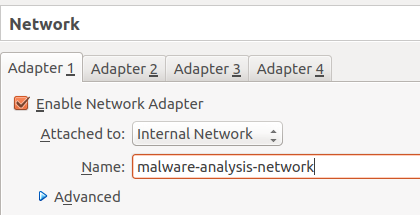
Set up your own malware analysis lab with VirtualBox, INetSim and …
(Example network configuration using INetSim for safe malware detonation.)
- Point the Windows VM’s DNS to the REMnux IP for realistic simulation.
- For controlled internet access (e.g., downloading samples), temporarily switch to NAT.
Best Practices:
- Always revert to clean snapshots before analyzing new samples.
- Use shared folders cautiously (read-only from host).
- For advanced evasion testing, consider bare-metal setups or additional anti-VM bypass tools.
Essential Tools for 2026
The table below categorizes top tools, highlighting free/open-source leaders and emerging AI-enhanced options.
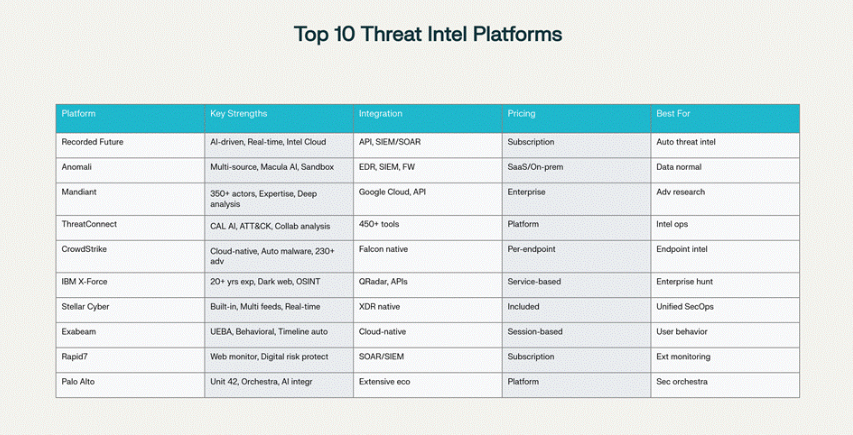
Top 10 Threat Intelligence Platforms (TIP) in 2025 – Stellar Cyber
(Overview of key threat intelligence and analysis platforms relevant to modern malware workflows.)
| Category | Tool | Platform | Key Features | Why It’s Essential in 2026 |
|---|---|---|---|---|
| Disassemblers/Decompilers | Ghidra (NSA) | Cross | Free, powerful decompilation, scripting | Best free alternative to IDA Pro |
| IDA Pro / IDA Free | Windows | Industry standard, plugins | Deep code analysis | |
| Binary Ninja | Cross | Modern UI, API support (Python/C++/Rust) | Rising favorite for automation | |
| Debuggers | x64dbg / x32dbg | Windows | Open-source, plugin ecosystem | Primary dynamic debugging tool |
| Static Analysis | PEStudio / PEView | Windows | Header, imports, entropy analysis | Quick triage |
| Detect It Easy (DIE) | Cross | Packer/obfuscation detection | Identifies packing techniques | |
| Dynamic/Behavioral | ProcMon / ProcDot | Windows | Process monitoring, visual graphs | Behavioral timeline creation |
| Wireshark | Cross | Network capture | C2 and exfil detection | |
| Sandboxes | Cuckoo Sandbox | Linux | Automated dynamic analysis | Scalable, customizable |
| ANY.RUN (cloud) | Web | Interactive, real-time | Fast triage with community reports | |
| Joe Sandbox / Hybrid Analysis | Web/On-prem | Deep behavioral reports | Advanced evasion handling | |
| Memory Forensics | Volatility 3 | Cross | RAM analysis | Fileless malware detection |
| AI-Enhanced | Intezer Analyze | Web | Genetic code similarity, automated triage | Rapid classification of unknowns |
| Other Must-Haves | YARA (rule scanner) | Cross | Signature-based hunting | Custom detection rules |
| Sysinternals Suite | Windows | Autoruns, Strings, TCPView | Persistence and process inspection |
Pro Tip for 2026: Integrate AI tools early—use Intezer or similar for initial automated classification to save hours on known families, freeing time for novel threats.
This setup positions you for professional-grade analysis. With isolation, snapshots, and the right tools, you’re ready to safely dissect even the most evasive 2026 threats.
Section 3: Initial Triage and Static Analysis
Initial triage and static analysis form the safest and fastest phase of malware investigation. You examine the sample without executing it, extracting valuable indicators while minimizing risk. In 2026, this phase is more critical than ever: AI-generated polymorphic malware often evades dynamic sandboxes, but static properties (hashes, strings, imports, entropy) remain reliable starting points.
The goal is rapid classification: Is this known malware? Is it packed or obfuscated? What are the obvious IOCs (URLs, registry keys, mutexes)? A skilled analyst can complete effective triage in under 15 minutes for most samples.
(High-level static analysis workflow – the foundation of safe, efficient triage.)
Step-by-Step Static Analysis Workflow
- Safe Acquisition and Isolation
- Transfer the sample into your lab via secure methods (e.g., shared folder in read-only mode or USB emulation).
- Immediately rename with its SHA256 hash for tracking: sample_sha256.exe.
- Hash Calculation and Reputation Check Compute multiple hashes (MD5, SHA1, SHA256) for cross-reference. Tools: PowerShell (Windows), sha256sum (REMnux).Example Commands:text
# Windows (FLARE-VM) Get-FileHash -Path sample.exe -Algorithm SHA256 # Linux (REMnux) sha256sum suspicious.docmUpload hashes to public repositories:- VirusTotal (primary – rich reports, community comments)
- Hybrid Analysis / ANY.RUN
- MalwareBazaar
- URLhaus (for associated URLs)
- 0-5 detections → likely novel or targeted.
- 50+ detections → known family; reference existing reports to accelerate analysis.
- File Type Identification Verify the claimed extension matches reality (common trick: double extensions like invoice.pdf.exe).Tools:
- file command (REMnux)
- TrID
- Detect It Easy (DIE) – excellent for signature-based type detection
file invoice.pdf.exe # Output: PE32+ executable (GUI) Intel 80386, for MS Windows - Strings Extraction Extract ASCII and Unicode strings – often reveals C2 domains, mutexes, error messages, or embedded payloads.Tools:
- Sysinternals strings.exe (FLARE-VM)
- FLOSS (FireEye – advanced, extracts obfuscated strings)
- BinText
strings -a sample.exe > strings.txt strings -u sample.exe >> strings.txt # Unicode floss --no-static sample.exe > floss_strings.txtWhat to Look For:- HTTP/HTTPS URLs (potential C2)
- IP addresses
- Registry paths (e.g., HKLM\Software\Microsoft\Windows\CurrentVersion\Run)
- Mutex names
- Ransomware notes or extensions
- API calls in plain text (e.g., “VirtualAllocEx”)
- PE Header and Section Analysis Focus on Windows PE/PE+ executables (most common malware format).Tools:
- PEStudio (visual, excellent for triage)
- PEView
- CFF Explorer
- Detect It Easy (DIE)
- Imports: Suspicious APIs (WriteProcessMemory, CreateRemoteThread → injection; IsDebuggerPresent → anti-analysis)
- Sections: Unusual names (.upx0, .data with RX permissions), high entropy (>7.5 → likely packed)
- Entropy: Overall >7.8 or individual sections >7.5 strongly suggest packing or encryption
- Timestamp: Compiled in the future or very old? Possible tampering.
- Overlay: Extra data appended (common for droppers)
- Packer and Obfuscation Detection Identify packing to plan unpacking strategy.Tools:
- Detect It Easy (DIE) – best single tool; identifies UPX, ASPack, Themida, VMProtect, etc.
- PEiD (legacy but still useful for signatures)
- Entropy analysis in PEStudio
- UPX (easy to unpack)
- Custom XOR/RC4 layers
- VMProtect/Themida (harder, often require manual dumping)
- AI-generated custom stubs (increasingly common)
- Initial Unpacking (If Needed) For known packers:text
upx -d packed.exe -o unpacked.exeFor unknown/custom: Note for dynamic analysis phase (memory dump during execution).
Quick Triage Checklist (2026 Edition)
| Check | Tool/Command | Red Flag Example |
|---|---|---|
| Hash lookup | VirusTotal / Hybrid Analysis | Low detections + recent submission |
| File type mismatch | file, DIE | .pdf claiming to be PE32+ |
| Suspicious strings | strings / FLOSS | C2 domains, ransomware note |
| High entropy | PEStudio / DIE | Overall >7.8 |
| Anti-analysis imports | PEStudio imports tab | IsDebuggerPresent, CheckRemoteDebuggerPresent |
| Unusual sections | CFF Explorer | .xyz with RX permissions |
AI-Assisted Triage Tip (2026)
Upload hashes or key strings to AI-powered platforms like Intezer Analyze or Recorded Future for genetic code similarity matching. These tools can classify unknown samples against massive repositories in seconds, often identifying family and capabilities faster than manual review.
Static analysis provides the roadmap: known vs. novel, packed vs. plaintext, obvious IOCs for immediate blocking. Only after thorough static review should you proceed to dynamic execution.
Section 4: Dynamic Analysis and Behavioral Monitoring
Dynamic analysis involves executing the malware in a controlled, isolated environment to observe its runtime behavior. This phase reveals what the sample actually does—file modifications, registry changes, network activity, process injection, persistence mechanisms, and payload deployment—that static analysis alone cannot uncover.
In 2026, dynamic analysis remains essential despite rising evasion techniques. AI-generated malware may delay execution, detect sandboxes, or adapt behavior, requiring multiple runs in varied environments and hybrid monitoring.
Key Objectives:
- Capture behavioral Indicators of Compromise (IOCs): files dropped, processes created, network connections.
- Identify persistence and privilege escalation.
- Observe command-and-control (C2) communication and data exfiltration.
- Detect anti-analysis tricks (e.g., VM/sandbox detection).
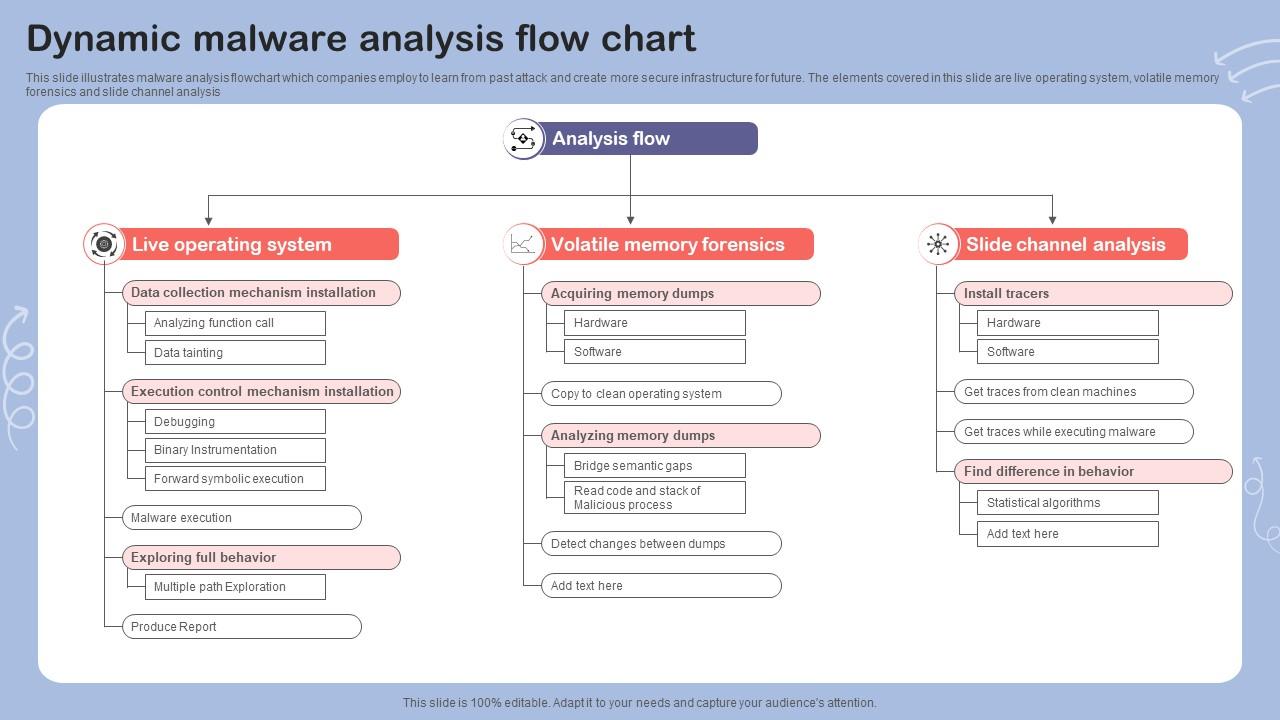
Dynamic Malware Analysis Flow Chart PPT Sample
(Dynamic malware analysis workflow flowchart – guiding safe execution and monitoring.)
Process flowchart of the malware analysis process during the …
(Detailed process flowchart for experimental dynamic analysis.)
Safe Execution Strategies
- Revert to Clean Snapshot Always start from a pristine VM state to ensure consistent, reproducible results.
- Execution Options:
- Manual/Local: Double-click the sample in FLARE-VM (for droppers/exes).
- Interactive Cloud Sandboxes: Upload to ANY.RUN or Hybrid Analysis for quick, safe runs with community insights.
- Automated Local Sandbox: Use Cuckoo Sandbox on a dedicated setup for batch analysis.
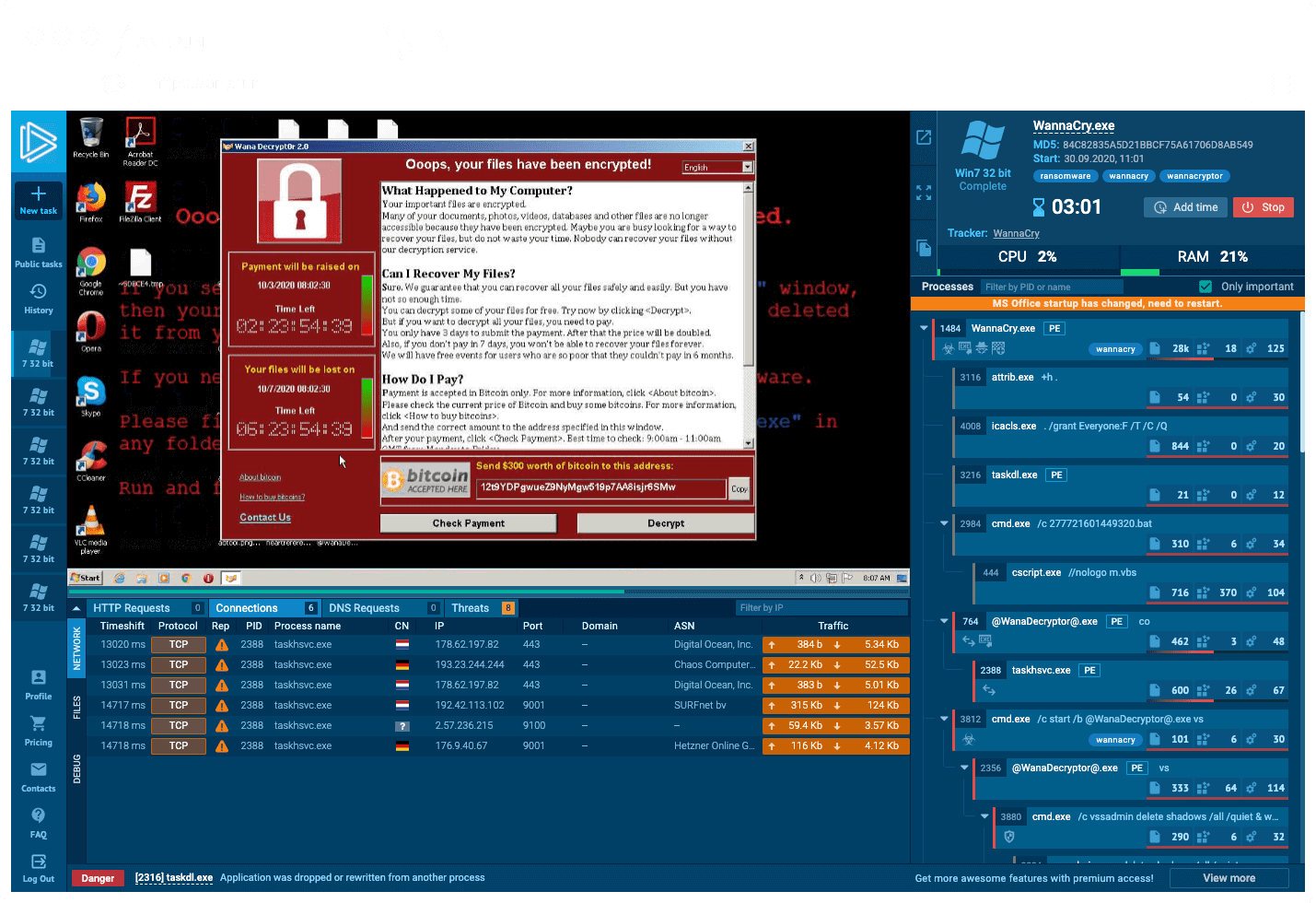
ANY.RUN – Interactive Online Malware Sandbox
(ANY.RUN interactive sandbox report showing real-time malware behavior.)
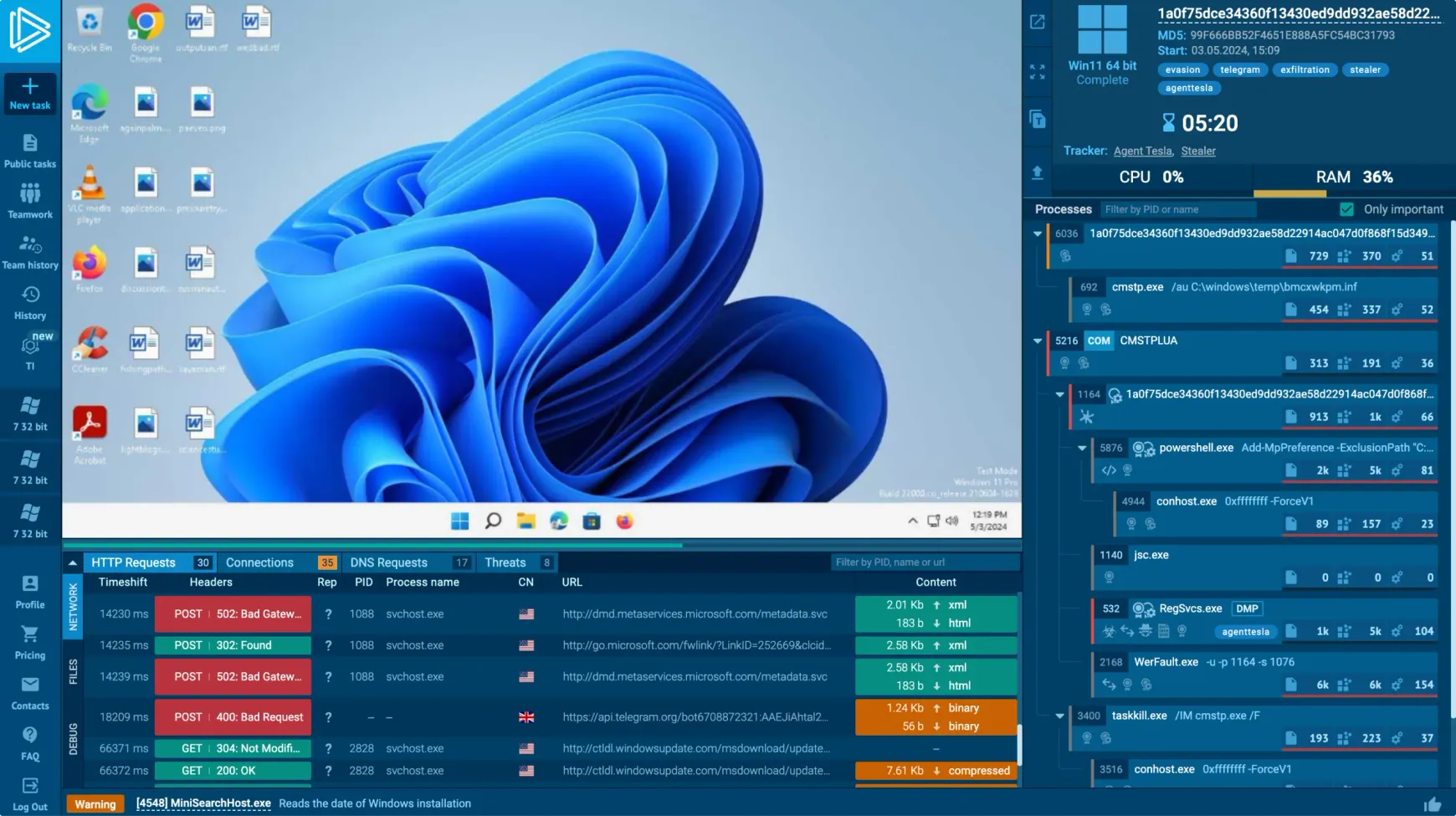
ANY.RUN – Dynamic Malware Analysis Sandbox
(Example of an automated dynamic analysis summary in ANY.RUN.)
Core Monitoring Tools and Techniques
| Category | Tool(s) | What to Monitor | 2026 Tips |
|---|---|---|---|
| Process/Activity | ProcMon (Process Monitor) | File, registry, process, network events | Filter for sample PID; capture before/after snapshots |
| ProcDot | Visual graphs from ProcMon logs | Excellent for timeline visualization | |
| Sysinternals Autoruns | Persistence mechanisms | Compare pre/post execution | |
| Network | Wireshark | Full packet capture | Filter for outbound HTTP/HTTPS/DNS |
| FakeNet-NG / INetSim | Simulated responses in isolated labs | Capture C2 without real internet | |
| Debugging | x64dbg | Step-through execution, breakpoints | Bypass delays/sleep calls |
| Snapshot Comparison | RegShot | Registry changes | Quick persistence detection |
| Advanced | API Monitor | Hooked API calls | Detect injection/evasion |
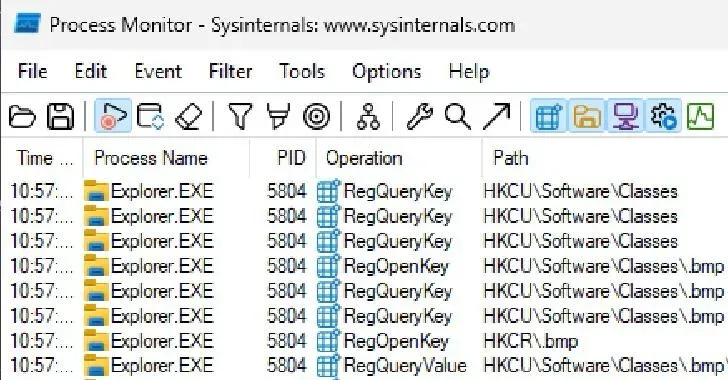
Malware Analysis Using Process Monitor(ProcMon) – GeeksforGeeks
(ProcMon capturing detailed malware file and registry operations.)
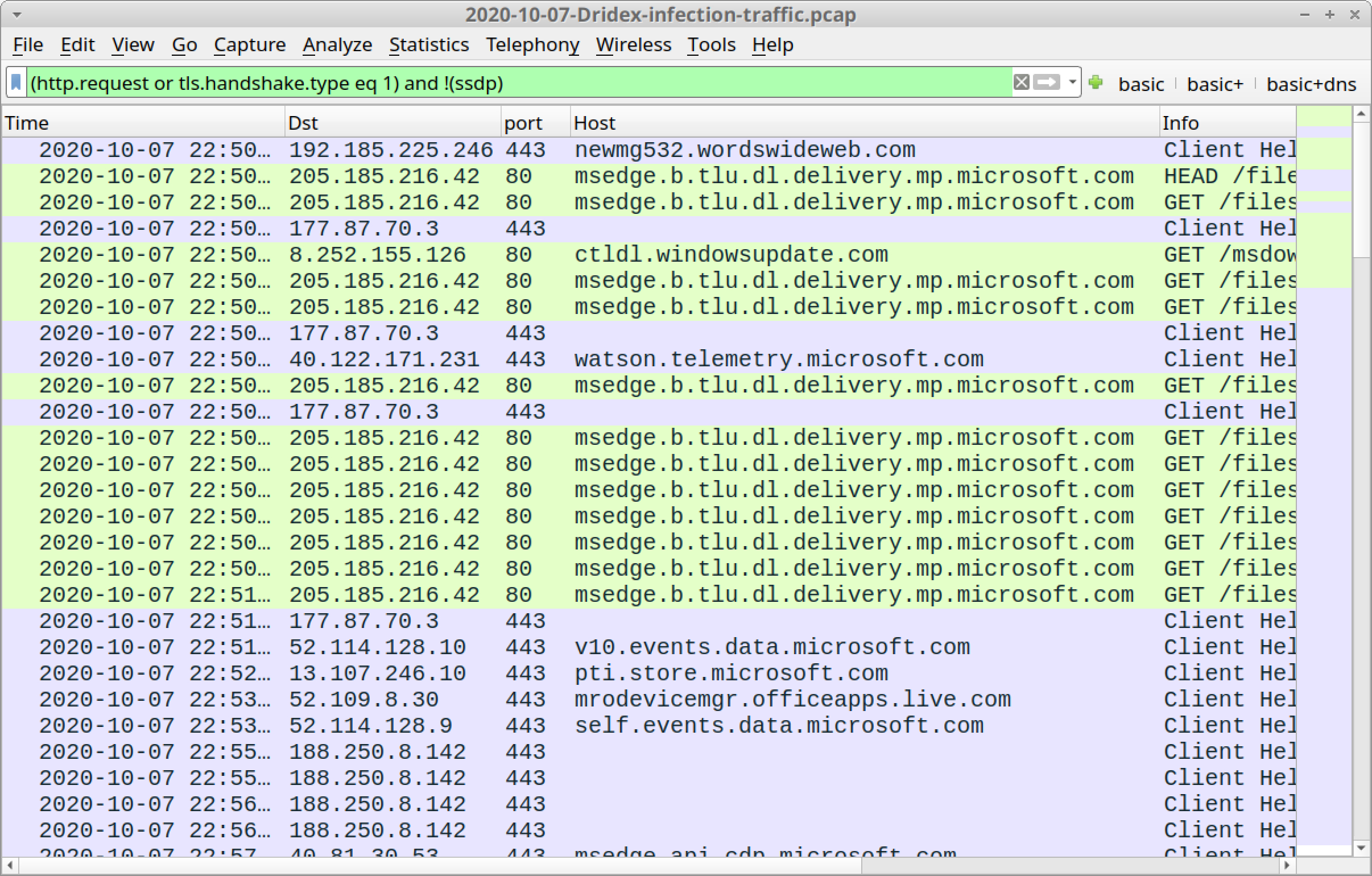
Wireshark Tutorial: Examining Dridex Infection Traffic
(Wireshark packet capture revealing malware C2 traffic patterns.)
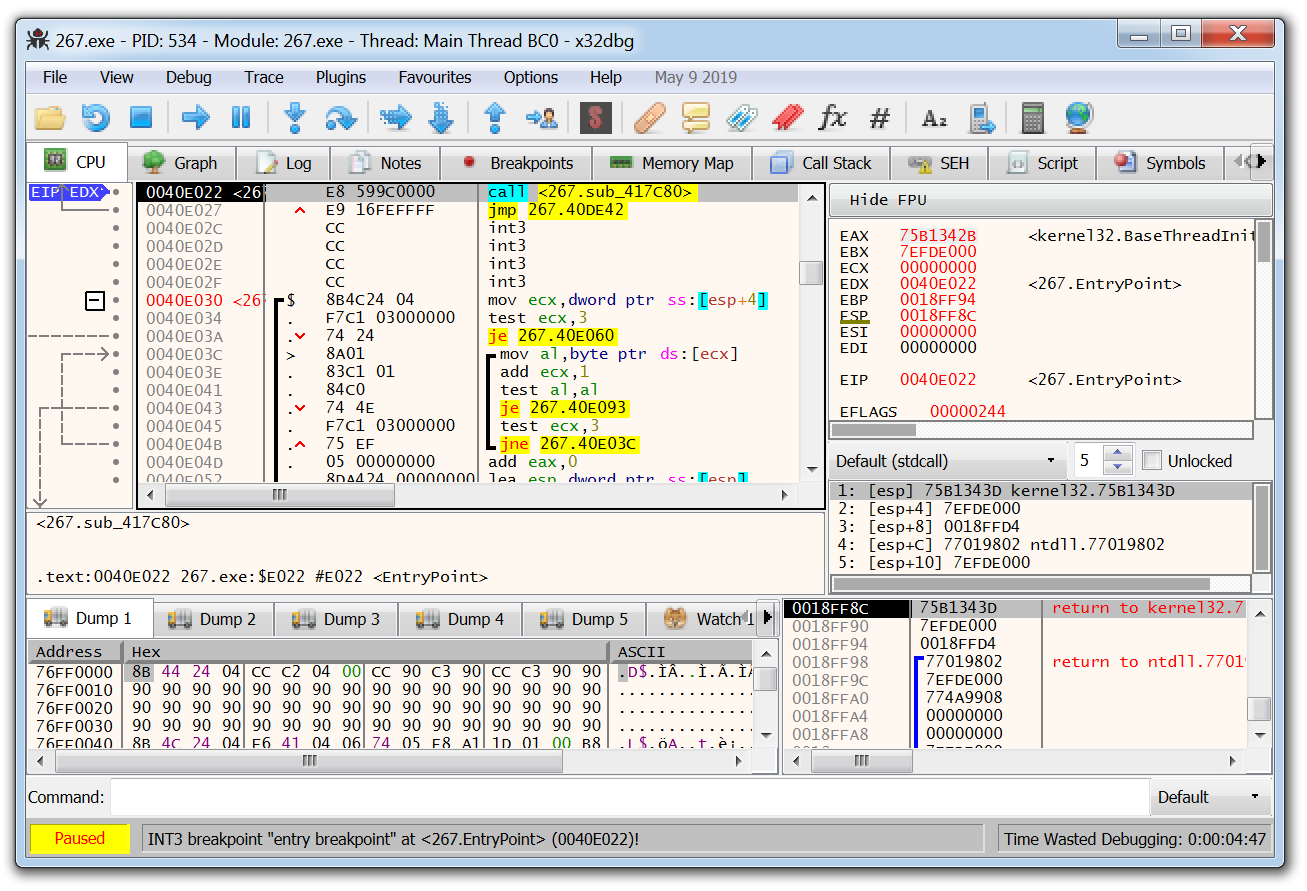
What is x64dbg + How to Use It
(x64dbg in action debugging a malware sample.)
Overcoming Evasion Techniques
Modern malware employs sophisticated anti-analysis:
- VM/sandbox detection (checking artifacts like VBox registry keys, low RAM).
- Debugger detection (IsDebuggerPresent, timing checks).
- Human interaction checks (mouse movement, user activity).
- Sleep delays (e.g., Sleep(1000000) to timeout sandboxes).
Countermeasures:
- Use ScyllaHide or TitanHide plugins in x64dbg to hide debugger presence.
- Patch evasion checks manually (NOP out instructions).
- Run in varied environments: different OS versions, with/without internet simulation.
- For delays: Accelerate time with tools like SleepFaker or set breakpoints before Sleep calls.
- Bare-metal analysis for highly evasive samples.
Malware Anti-VM Techniques
(Common malware anti-VM and anti-analysis evasion techniques.)
Best Practices for 2026
- Run multiple iterations: With fake internet, without, different user privileges.
- Combine tools: Start with ProcMon + Wireshark, then debug suspicious behaviors.
- Document everything: Screenshots, logs, timelines.
- Hybrid approach: Use cloud sandboxes for initial runs, local for deep dives.
- AI assistance: Feed behavioral logs to tools like Intezer for family classification.
Dynamic analysis bridges static findings to real-world impact, providing the evidence needed for IOCs, detections, and deeper reverse engineering.
Section 5: Reverse Engineering Mastery
Reverse engineering is the pinnacle of malware analysis: transforming machine code back into human-readable logic to fully understand capabilities, decrypt payloads, bypass protections, and develop robust defenses. In 2026, RE mastery is indispensable as AI-generated malware introduces complex obfuscation, custom cryptography, and adaptive behaviors that evade automated tools.
This section builds on static and dynamic findings, focusing on disassembly, decompilation, debugging, and code reconstruction.

A flow chart of reverse engineering process. | Download Scientific …
(High-level reverse engineering process flowchart.)
Core Tools for Reverse Engineering (2026)
| Tool | Type | Strengths | Best For |
|---|---|---|---|
| Ghidra | Free Decompiler (NSA) | Powerful decompilation, scripting (Python/Java), collaborative | Primary tool for most analysts – cost-effective mastery malwaretech.comVideo: First Look at Ghidra (NSA Reverse Engineering Tool) malwaretech.comVideo: First Look at Ghidra (NSA Reverse Engineering Tool) |
(Ghidra disassembler and decompiler view during malware analysis.)
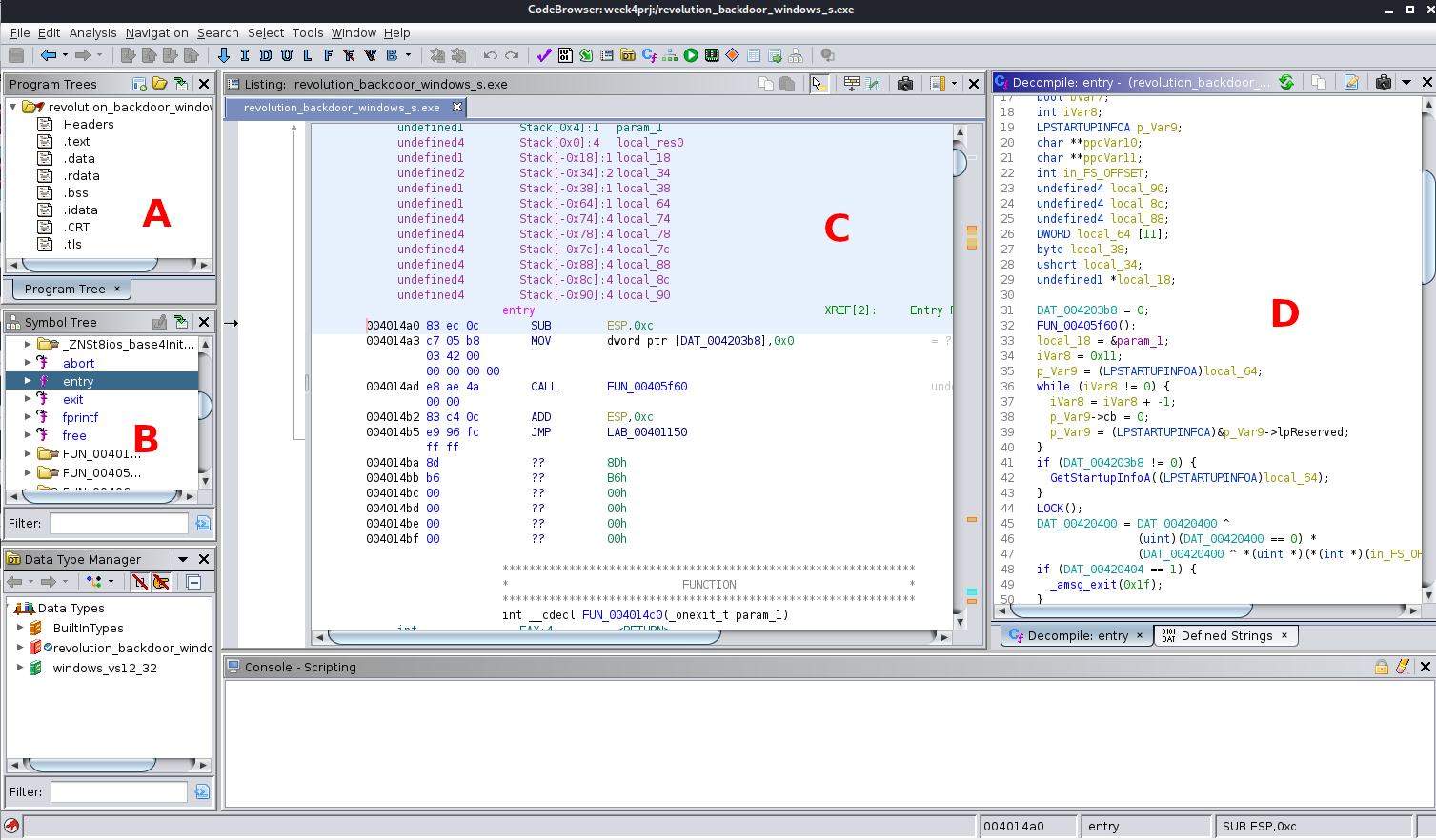
CS6038/CS5138 Malware Analysis, UC by ckane
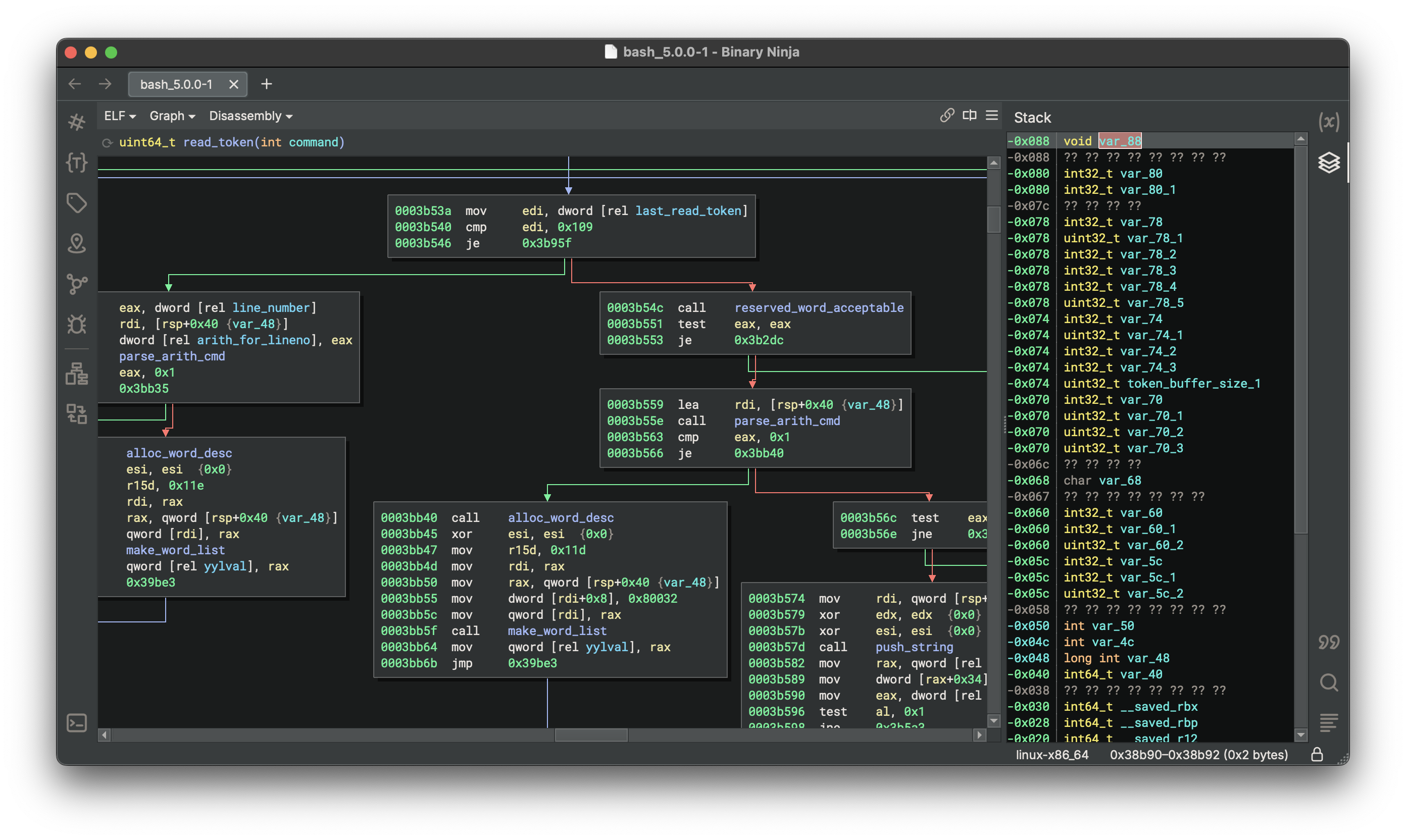
(Annotated Ghidra interface analyzing a sample.) | | IDA Pro / IDA Free | Industry Standard | Best interactivity, plugins (Hex-Rays decompiler), FLIRT signatures | Professional environments, deep Windows internals | | Binary Ninja | Modern Intermediate Language | Clean UI, strong API (Python), cloud/enterprise features | Automation and scripting-heavy workflows
Binary Ninja
(Binary Ninja graph view with stack visualization.) | | x64dbg | Debugger | Open-source, plugin-rich (ScyllaHide for anti-anti-debug) | Runtime patching and dynamic RE
What is x64dbg + How to Use It
(x64dbg interface debugging a malware sample.) |
Reverse Engineering Workflow
- Load and Auto-Analyze Import the unpacked sample into Ghidra/IDA/Binary Ninja. Run auto-analysis to identify functions, strings, imports, and cross-references.
- Disassembly Review Examine the listing view: Rename functions (e.g., sub_401000 → DecryptConfig), label variables, add comments.

Screenshot of IDA Pro disassembler still features a searchable …
(IDA Pro disassembly view of a malware sample.)
- Decompilation and Pseudocode Switch to decompiler view (Ghidra or Hex-Rays). Transform assembly into C-like code for higher-level understanding.
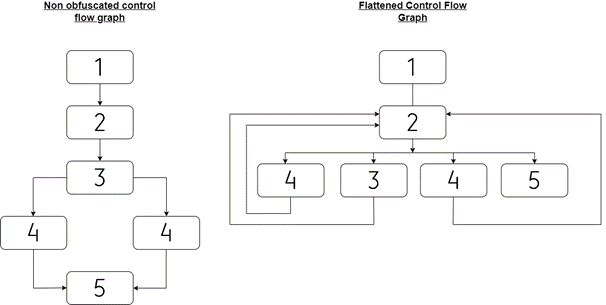
- Control Flow Analysis Use graph view to trace execution paths. Identify obfuscation like control flow flattening (common in Emotet variants).
Attacking Emotet’s Control Flow Flattening | SOPHOS
(Example of control flow flattening obfuscation encountered in malware.)
- Key Techniques:
- String Decryption: Trace references to encrypted strings; set breakpoints on decryption routines.
- Configuration Extraction: Locate and emulate config parsers to dump C2 URLs, keys.
- Shellcode Analysis: Extract and emulate position-independent code.
- Patching: Use debugger to NOP anti-debug checks or force execution paths.
- Scripting: Automate repetitive tasks (e.g., Ghidra Python scripts for bulk renaming).
- Advanced Topics:
- 64-bit Windows Internals: Understand PEB walking, syscall stubs, heaven’s gate techniques.
- Kernel Drivers: Analyze rootkits with Windbg (preview edition) or Ghidra kernel support.
- AI-Assisted RE: Use emerging tools like Ghidra’s built-in AI features or external LLMs to suggest function names and explain code snippets (always verify manually).
Common Challenges and Solutions (2026)
- Polymorphic/Custom Obfuscation: Manual reconstruction of logic; use symbolic execution (angr, Miasm).
- Virtualized Packers (VMProtect/Themida): Dynamic dumping at OEP (Original Entry Point) using Scylla.
- AI-Generated Code: Look for unnatural patterns (repetitive loops, unusual API sequences); leverage decompiler improvements trained on vast corpora.
Hands-On Goals
By mastering this phase, you can:
- Extract encrypted configurations.
- Reconstruct ransomware decryptors.
- Identify zero-day exploitation logic.
- Contribute high-fidelity IOCs and YARA rules.
Reverse engineering turns unknowns into actionable intelligence—elevating you from analyst to threat hunter.
Section 6: Incident Response Playbook for Malware Incidents
Malware incidents demand a structured, rapid response to minimize damage, eradicate threats, and restore operations. This section provides a practical, actionable playbook tailored for malware outbreaks, blending NIST SP 800-61r2, CISA Federal Response Playbooks, and real-world SOC best practices from 2025-2026.

Incident Response | CSRC
(NIST Incident Response Lifecycle – the foundational model for structured handling.)
StopRansomware Guide | CISA
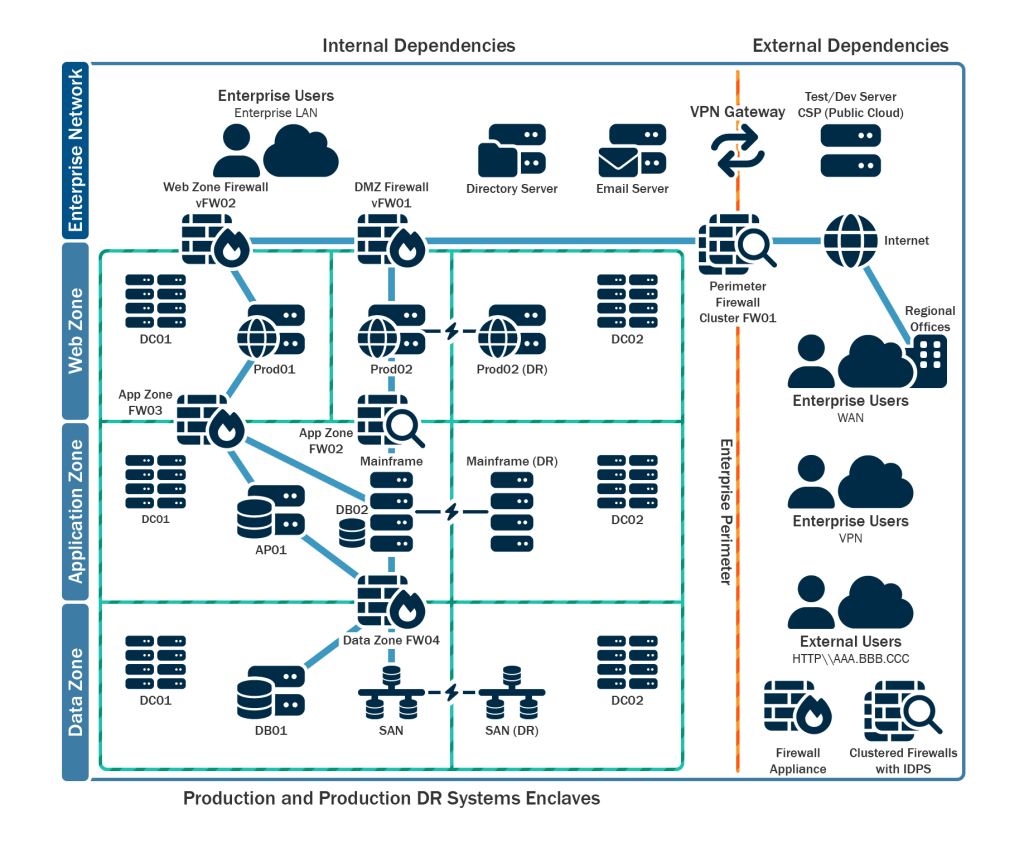
(CISA-aligned ransomware/malware response flowchart emphasizing coordinated actions.)
The playbook follows six core phases: Preparation, Detection & Analysis, Containment, Eradication, Recovery, and Post-Incident Activity. Integrate malware analysis findings (from Sections 3-5) directly into Detection, Eradication, and Lessons Learned.
Phase 1: Preparation (The Foundation of Resilience)
Build capabilities before an incident strikes—80% of successful responses stem from strong preparation.
- Form a Cross-Functional CSIRT (Cyber Security Incident Response Team): Include IT, security, legal, comms, and exec sponsors.
- Deploy Tools: EDR (CrowdStrike, SentinelOne), SIEM (Splunk, Elastic), network monitoring, offline backups.
- Develop Playbooks: Specific runbooks for ransomware, infostealers, wipers.
- Test Regularly: Tabletop exercises + red/blue team simulations.
- Secure Backups: Immutable, air-gapped, tested quarterly.
2026 Tip: Implement AI-assisted alerting (e.g., Microsoft Security Copilot) for faster triage.
Phase 2: Detection & Analysis (Identify and Scope)
Leverage alerts and analysis to confirm a malware incident.
- Initial Detection Sources: EDR alerts, AV hits, anomalous behavior (UEBA), user reports.
- Triage with Analysis:
- Collect samples → Perform static/dynamic analysis (Sections 3-4).
- Extract IOCs: Hashes, C2 domains, persistence keys.
- Map to MITRE ATT&CK (e.g., TA0001 Initial Access → T1566 Phishing).
MITRE ATT&CK Matrix
(MITRE ATT&CK Enterprise Matrix – map observed behaviors to tactics and techniques.)
- Scope Impact: Identify affected hosts, data exfiltrated, lateral movement.
Timeline Goal: Confirm and scope within 4-8 hours.
Phase 3: Containment (Stop the Bleeding)
Short-term: Isolate to prevent spread. Long-term: Preserve evidence.
- Immediate Actions:
- Isolate infected hosts (network segmentation, firewall rules).
- Block IOCs enterprise-wide (hashes via EDR, domains/IPs via proxy/DNS).
- Disable compromised accounts.
- Evidence Preservation: Forensic images of memory/disks before shutdown.
Ransomware Specific: Do NOT pay unless authorized—coordinate with law enforcement (FBI, CISA).
Phase 4: Eradication (Remove the Threat)
Eliminate malware and close entry points.
- Reimage affected systems from clean sources.
- Hunt for remnants: Use YARA rules from analysis, memory forensics.
- Patch vulnerabilities exploited (e.g., ProxyShell, Log4j legacies).
- Reset credentials en masse if keys compromised.
What is Malware? Detecting, Preventing & Managing Threats – Palo …
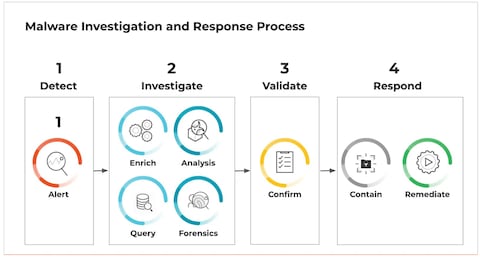
(Malware investigation, eradication, and recovery process overview.)
Phase 5: Recovery (Restore and Monitor)
Return to normal operations safely.
- Deploy rebuilt systems from backups.
- Gradual reconnection with enhanced monitoring.
- Extended monitoring (30-90 days) for re-infection.
Phase 6: Post-Incident Activity (Lessons Learned)
Turn pain into prevention.
- Root cause analysis report.
- Update detections (new signatures, behavioral rules).
- Revise playbooks and train staff.
- Share anonymized IOCs (e.g., via ISACs).
Malware IR Checklist Template (Downloadable/Adaptable)
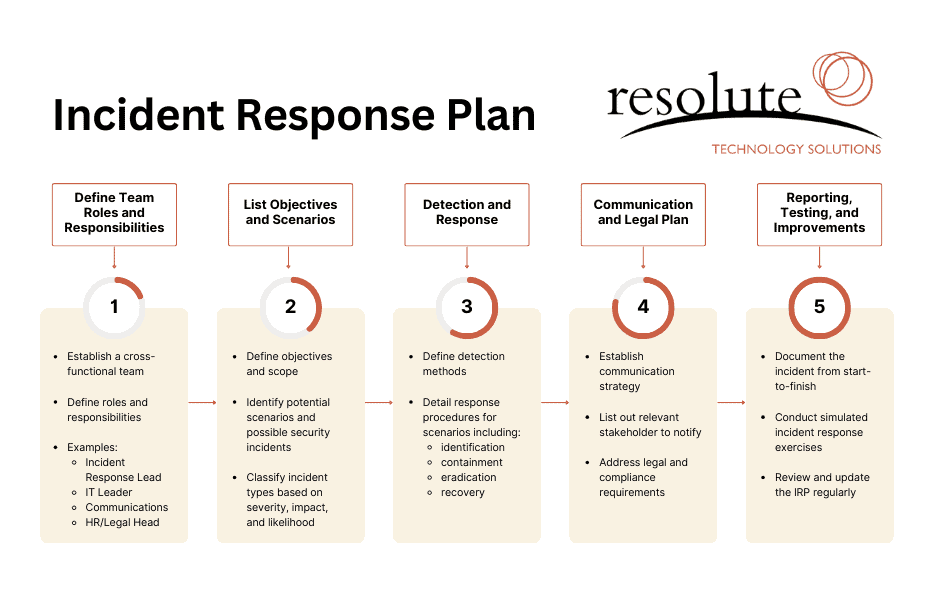
How to Create an Incident Response Plan – Resolute
(Sample incident response plan checklist – customize for your organization.)
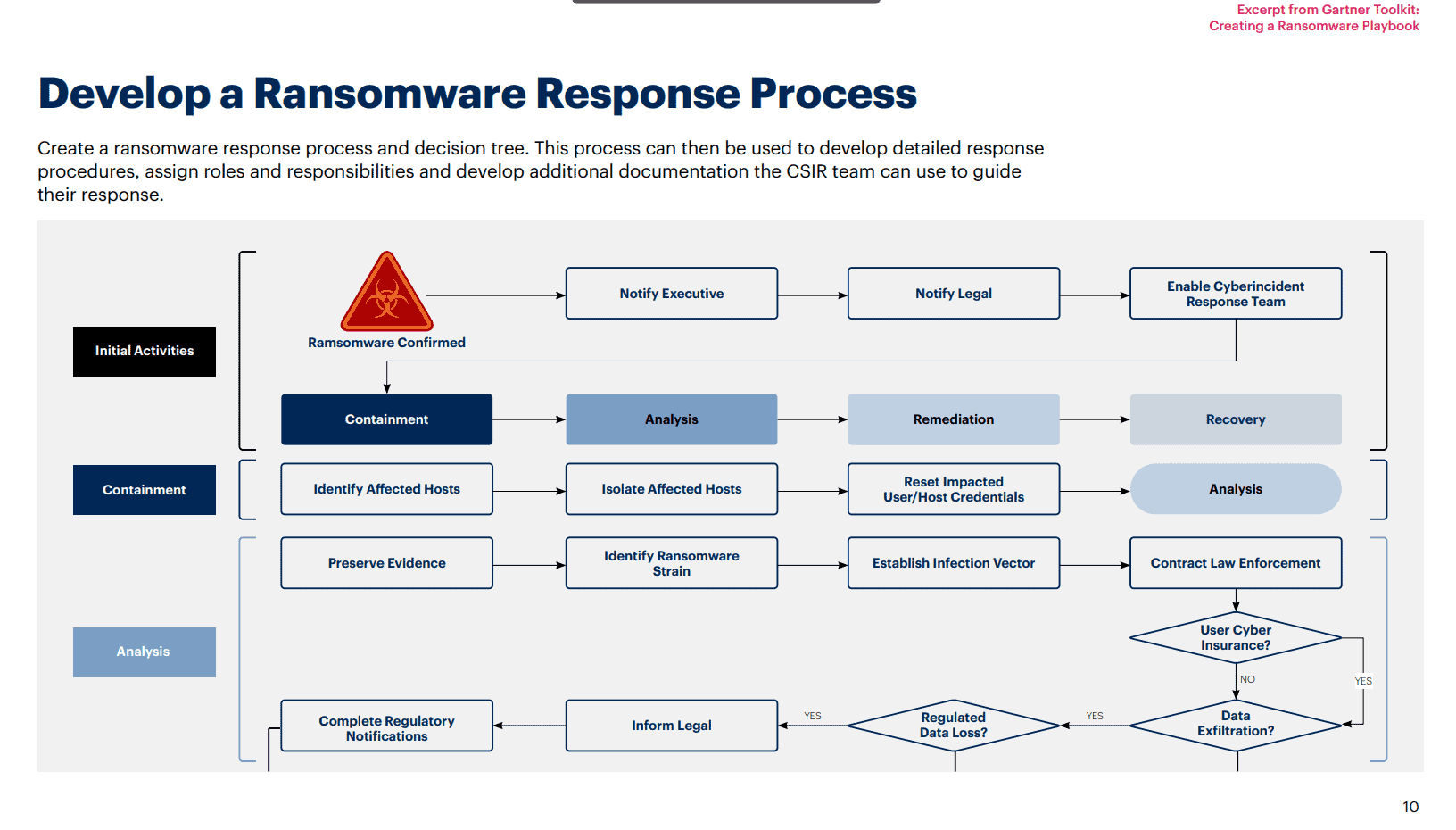
How to Create an Incident Response Plan – Resolute
(Ransomware-specific incident response checklist highlighting key actions.)
| Phase | Key Actions | Owner | Timeline | Done? |
|---|---|---|---|---|
| Preparation | CSIRT roster updated, backups tested | Security Lead | Ongoing | |
| Detection | Confirm IOCs, scope blast radius | Analyst | <4 hours | |
| Containment | Isolate hosts, block C2 | SOC | <2 hours | |
| Eradication | Reimage, hunt remnants | Forensics | <24 hours | |
| Recovery | Restore from backup, monitor | Ops | <48 hours | |
| Lessons Learned | Report, update rules | CSIRT | <1 week |
Integrating deep malware analysis into IR transforms reactive firefighting into proactive defense—turning every incident into stronger future resilience.
Section 7: Advanced Topics and Real-World Case Studies
This section explores cutting-edge threats defining the 2026 landscape, blending emerging technologies with evolving attacker tactics. We’ll examine AI-powered malware, cloud-native attacks, cross-platform and IoT threats, and dissect anonymized real-world case studies from 2025 campaigns. These insights bridge theory to practice, equipping you with forward-looking defenses.
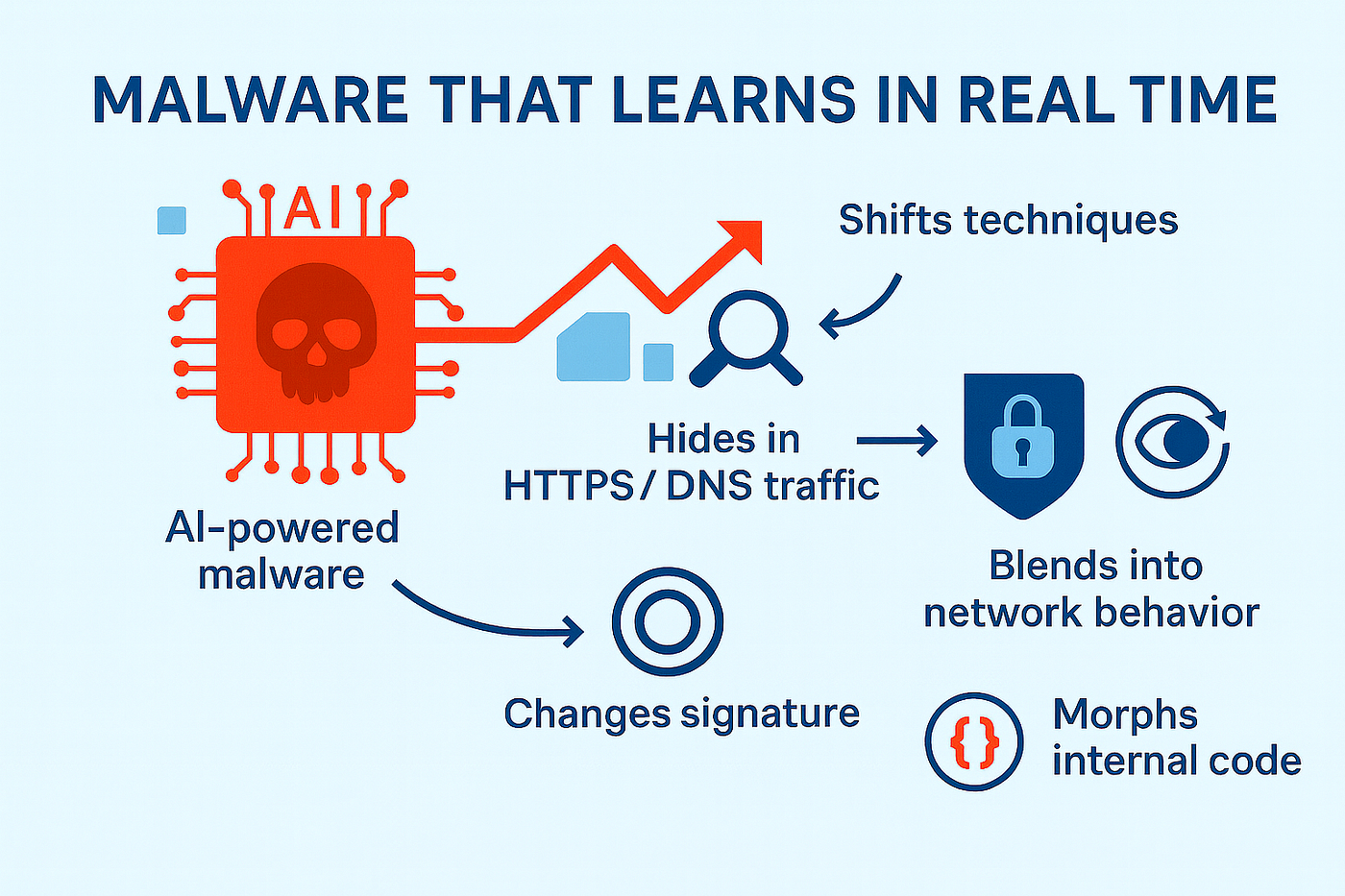
How Zero-Day AI Attacks Exploit Vulnerabilities in Real Time …
(Conceptual visualization of AI-driven zero-day attacks and polymorphic malware generation.)

1,027 Cyber Threat Infographic Stock Vectors and Vector Art …
(Infographic on digital threat detection and malware prevention in the AI era.)
Emerging Threats in 2026
1. AI-Powered and Autonomous Malware
2025 marked the mainstream arrival of AI-assisted malware, with attackers using LLMs (e.g., Claude, Gemini) for code generation, obfuscation, and evasion. Notable examples:
- PromptLock/Ransomware 3.0: A prototype/research PoC using embedded prompts to generate Lua encryption scripts dynamically.
- BlackMamba-style Polymorphism: Runtime code generation via APIs to create evasive keyloggers.
- Operational cases: Russian-linked PromptSteal for script generation; low-skill actors selling AI-generated ransomware variants.
Predictions for 2026: Rise of “agentic” malware—self-adapting worms that use AI for reconnaissance, decision-making, and tactic shifts. Defenses: Behavioral monitoring, API abuse detection, and AI-driven anomaly tools (e.g., Intezer + ML models).
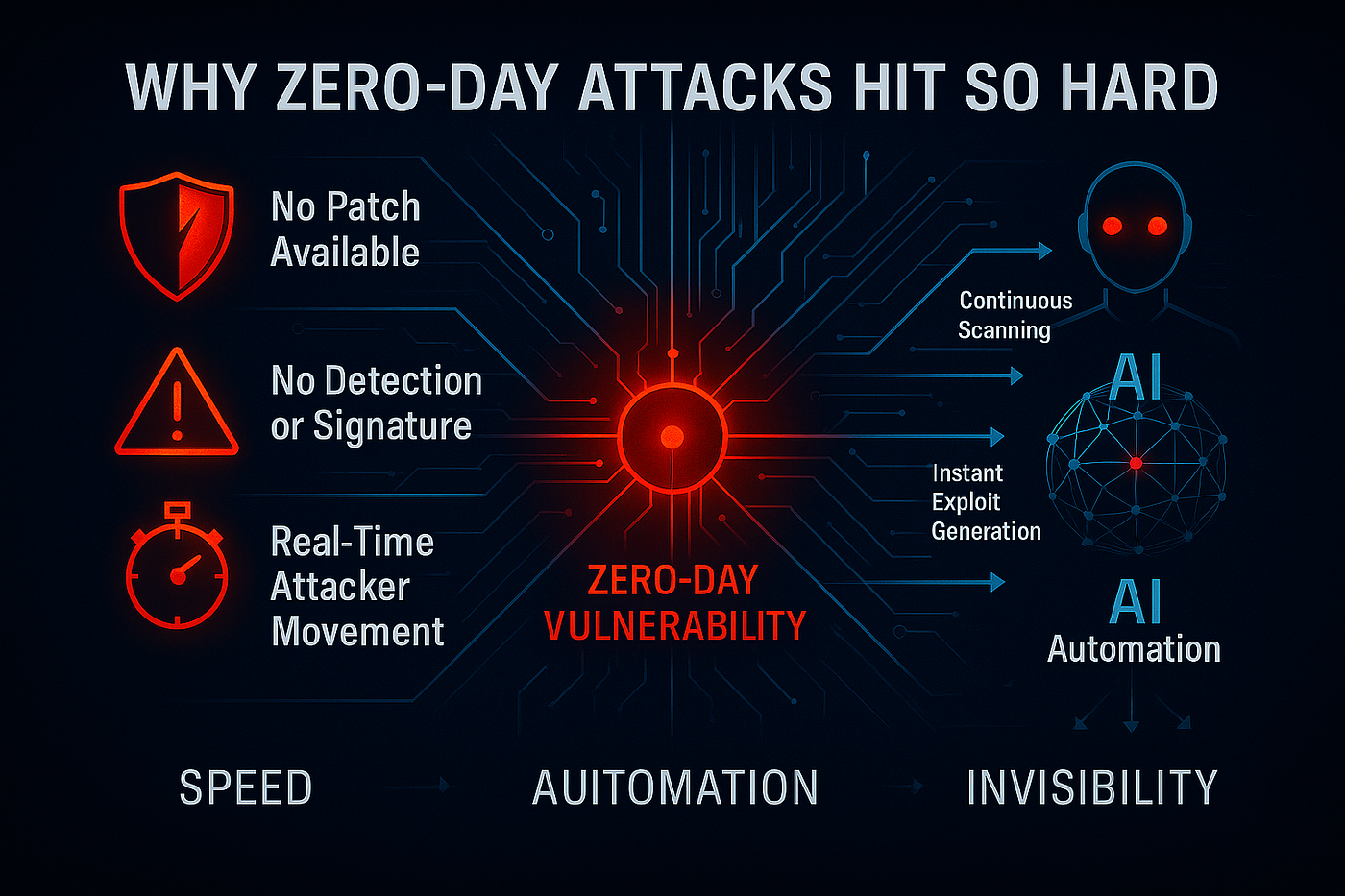
How Zero-Day AI Attacks Exploit Vulnerabilities in Real Time …
*(Advanced AI malware exploiting vulnerabilities in real-time.)
2. Cloud-Native and Hybrid Attacks
Threat actors shifted to cloud-focused tactics in 2025, exploiting misconfigurations and native features for data exfiltration/destruction without traditional malware.
- Storm-0501: Evolved to cloud ransomware—rapid exfil via OneDrive/SharePoint, backup destruction, no endpoint encryption needed.
- WARP PANDA (China-nexus): Sophisticated lateral movement in Azure/VMware, targeting M365 data.
- Trends: Abuse of legitimate cloud tools (e.g., KMS keys, APIs) for persistence and extortion.
2026 Outlook: Increased “cloud-native ransomware” and supply-chain attacks via SaaS. Defenses: Zero-trust architecture, immutable backups, cloud workload protection platforms (CWPP).

Cloud-Native Ransomware – How attacks on availability leverage …
(Diagram of cloud-native ransomware leveraging availability and services.)
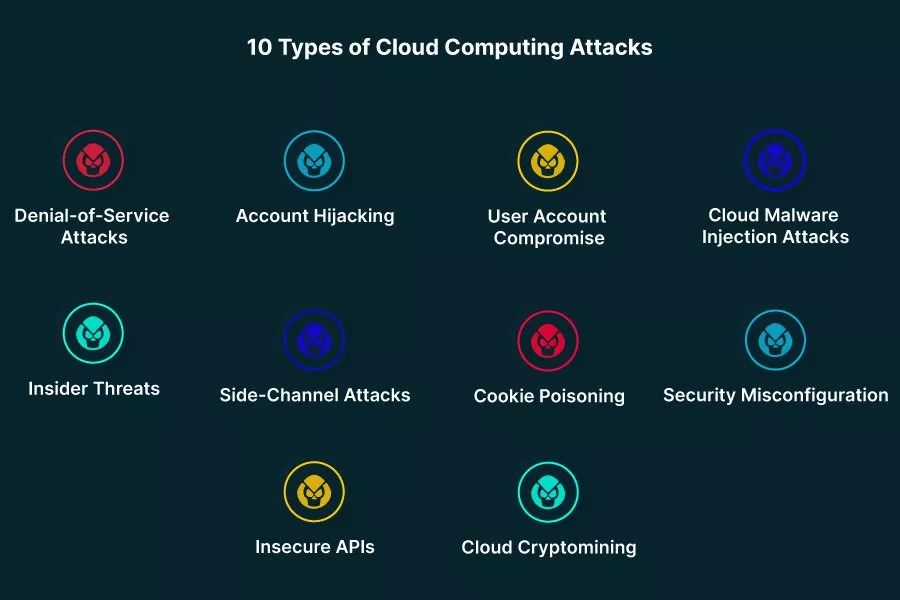
Top 10 Cloud Attacks and What You Can Do About Them – Aqua
*(Overview of common cloud attack vectors and techniques.)
3. Cross-Platform, Mobile, and IoT Threats
Malware transcended Windows in 2025:
- Cross-platform code (Rust/Go) enabled unified threats across Windows, macOS, Linux, Android, IoT.
- Mobile surge: Android adware/PUPs doubled; banking trojans like Herodotus/RatOn with overlays and NFC relay.
- IoT: Mirai/Gafgyt variants dominated honeypots; 861% spike in education-sector attacks.
2026: AI-enhanced IoT botnets for autonomous exploitation; deeper mobile fraud integration.
ELBA-IoT: An Ensemble Learning Model for Botnet Attack Detection …
(Visualization of IoT botnet attack detection and ensemble modeling.)
ELBA-IoT: An Ensemble Learning Model for Botnet Attack Detection …
*(Detailed IoT botnet traffic and attack patterns.)
Real-World Case Studies (Anonymized from 2025 Incidents)
Case 1: Lumma Stealer Campaign Evolution
- Initial Access: ClickFix social engineering (fake CAPTCHAs/clipboard hijacking) expanded to macOS/Linux.
- Behavior: Credential theft fueling downstream ransomware (e.g., Qilin/Akira).
- Analysis Highlights: High-volume C2 via Discord/Cloudflare; AI-assisted variant testing on VirusTotal.
- Lessons: Multi-platform monitoring; user awareness training critical.
![What is Ransomware? How Does It Work? [2025 Uptated] - Keepnet](https://timely-benefit-e63d540317.media.strapiapp.com/How_Ransomware_Works_8bdbb4a628_b75b832b0f.jpg)
What is Ransomware? How Does It Work? [2025 Uptated] – Keepnet
(Infographic: How ransomware works – from infection to extortion.)
Case 2: AsyncRAT/SocGholish Loader Chain
- Vector: Malvertising (fake updates) → JavaScript loader → RAT deployment.
- Impact: Persistence, keylogging, lateral movement; topped detections in multiple quarters.
- Advanced Evasion: Asynchronous C2; integration with stealers like RustyStealer.
- Defense: Browser isolation; behavioral EDR rules for script execution.
Case 3: Qilin Ransomware Healthcare Blitz
- Tactics: 200+ incidents; triple extortion (encrypt, exfil, DDoS threat).
- Entry: Often via initial stealers (Lumma) or unpatched edges.
- Outcome: Weekly healthcare breaches; high disruption.
- Mitigation: Offline backups; rapid IOC blocking.

Anatomy of a Ransomware Attack: a Guide to Prevention and Recovery
(Anatomy of a modern ransomware attack lifecycle.)
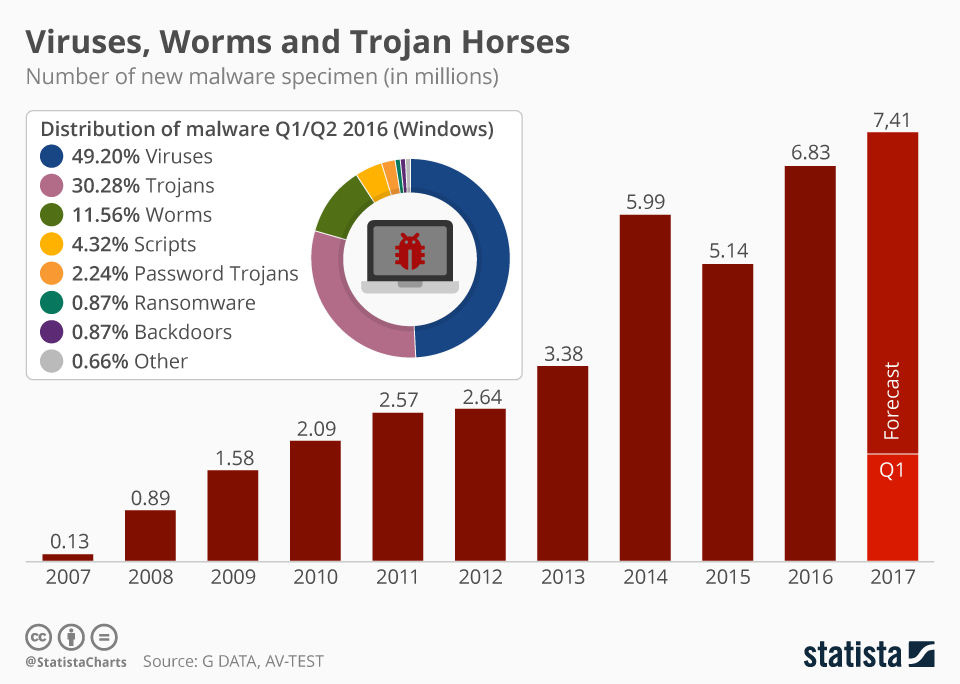
Chart: Ransomware Makes up Small Share of Growing Malware Threat …
(Statistical view of ransomware within the broader malware ecosystem.)
These threats underscore the need for hybrid defenses: Combine signature-based tools with AI/ML anomaly detection, zero-trust, and continuous threat hunting.
Section 8: Best Practices, Career Tips, and Resources
This final section consolidates timeless best practices, provides guidance for building a world-class career in malware analysis, and curates essential resources to keep you at the forefront of the field. Mastery isn’t a destination—it’s continuous adaptation in an ever-evolving threat landscape.

Top 10 Malware Analysis Templates with Examples and Samples
(Malware analysis process to prevent future cyberattacks – core best practices visualized.)
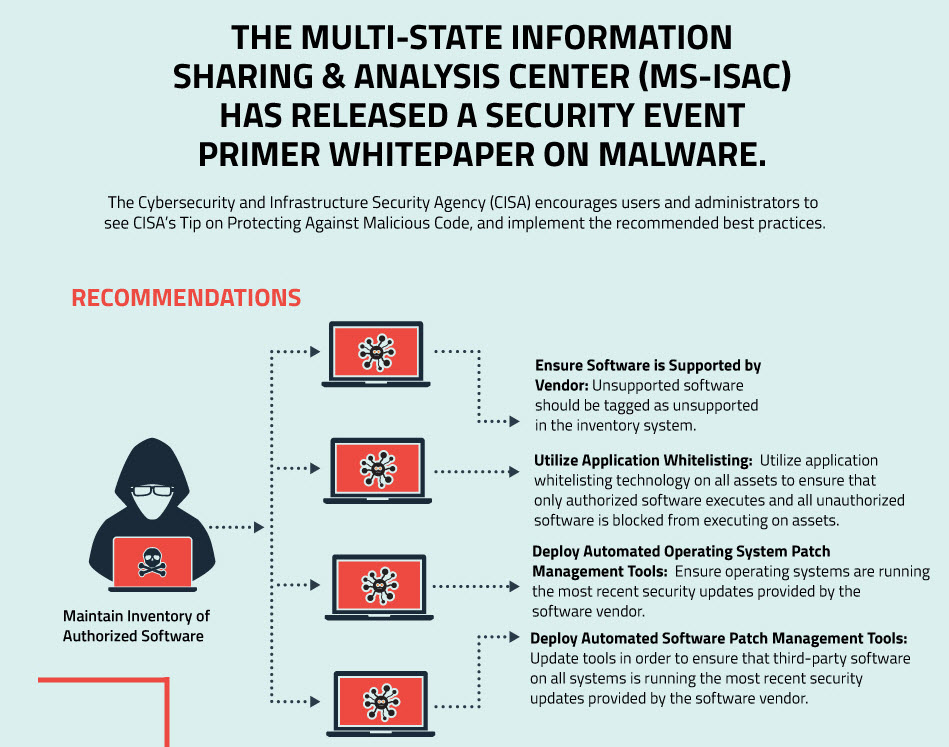
Exclusive Infographic: MS-ISAC Security Event Primer on Malware
(Security primer on malware events and response best practices.)
Best Practices for Professional Malware Analysis
- Document Relentlessly: Capture every step—screenshots, tool outputs, timelines, hypotheses. Use structured templates for consistency.

Top 10 Malware Analysis Templates with Examples and Samples
(Example malware analysis report section on challenges and findings.)

Top 10 Malware Analysis Templates with Examples and Samples
(Key stages of the malware analysis process – use as a report framework.)
- Hybrid Human-AI Workflow: Leverage AI for triage (e.g., Intezer, VT reports) but always manually verify critical findings.
- Safe & Reproducible: Snapshot clean states; isolate networks; never analyze on production systems.
- Contribute Back: Write YARA rules, share anonymized IOCs, blog findings—strengthen the community.
- Stay Current: Follow daily threat reports; automate feeds (MISP, AlienVault OTX).
- Ethical Mindset: Respect privacy; source samples legally; focus on defense.
Career Tips: Becoming a Top-Tier Malware Analyst in 2026
The field is booming—demand for skilled reverse engineers outpaces supply, with roles in SOCs, threat intel firms, government, and consulting paying premium salaries.
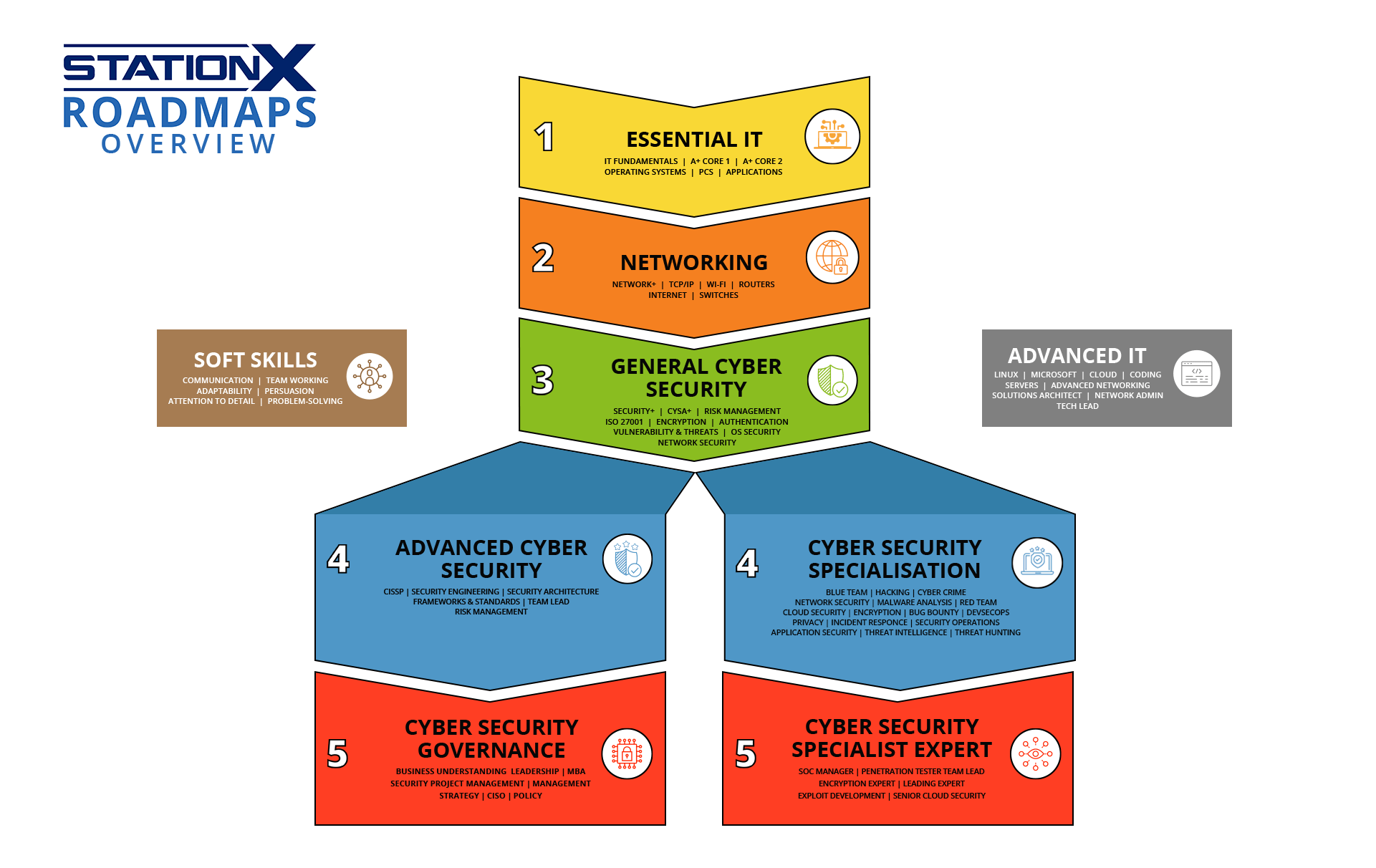
Career Change to Cyber Security in 2026 (+Free eBook)
(Cybersecurity career roadmaps overview – entry to expert paths.)
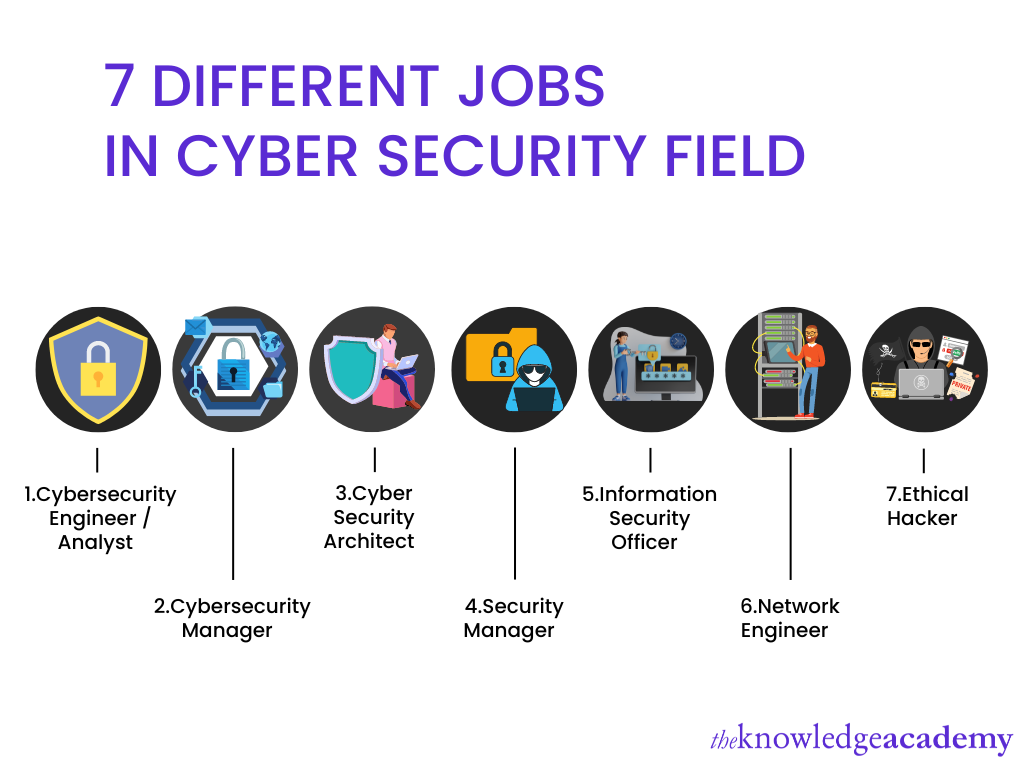
Cyber Security Roadmap For Beginners: A 2026 Guide
(Diverse job roles in the cybersecurity field.)
Progression Path:
- Entry-Level: Start with CompTIA Security+, blue-team basics, basic scripting (Python/PowerShell).
- Intermediate: Hands-on labs (Malware Unicorn, LetsDefend), certifications like GFACT.
- Advanced: Deep RE with Ghidra/IDA; pursue gold-standard certs.

GIAC Reverse Engineering Malware (GREM) was issued by Global …
(GIAC Reverse Engineering Malware (GREM) certification – the premier credential for malware analysts.) 4. Expert: Contribute to open-source (YARA repos), speak at conferences (Black Hat, REcon), lead hunts.
Key Certifications:
- GREM (GIAC Reverse Engineering Malware) – Gold standard for RE.
- GCFA (GIAC Certified Forensic Analyst) – Forensics complement.
- OSCP/OSCE – Offensive perspective.
- Free/Accessible: SANS FOR610 training materials, HTB Academy modules.
Build Visibility: Publish write-ups (Medium, personal blog), participate in CTFs, network on LinkedIn/X.
Essential Resources
Books (Timeless Foundations):
Practical Malware Analysis [Book]
(Practical Malware Analysis – the bible of hands-on labs.)
Learning Malware Analysis [Book]
(Learning Malware Analysis – comprehensive modern guide.)
- Practical Malware Analysis by Michael Sikorski & Andrew Honig
- Learning Malware Analysis by Monnappa KA
- Malware Analyst’s Cookbook by Ligh et al.
Online Platforms & Communities:
- Labs: MalwareTrafficAnalysis.net (exercises), ANY.RUN (interactive sandbox), HackTheBox Academy.
Introduction to Malware Analysis Course | HTB Academy
(HTB Academy Introduction to Malware Analysis module.)
- Blogs: Mandiant FLARE, CrowdStrike, Kaspersky Threat Intel, Krebs on Security.
- Communities: Reddit r/Malware, r/ReverseEngineering; Discord (Malware Unicorn); X hashtags #malware #RE.
- Tools Docs: REMnux.org, Ghidra SRE blog, x64dbg plugins.
Appendices (In Full Playbook):
- Tool Cheat Sheet (quick commands)
- Sample Report Template
- Glossary of Terms
- YARA Rule Starter Pack
Thank you for reading this playbook . With these practices, resources, and mindset, you’re equipped to become one of the world’s top malware analysts in 2026 and beyond.
The Ultimate Malware Analyst Playbook 2026 is now complete.
#CyberDudeBivash #CyberSecurity #InfoSec #MalwareAnalysis #ReverseEngineering #CyberThreats
 Cyberdudebivash
Leave a comment