By Bivash Kumar Nayak – Cybersecurity & AI Expert | Co-owner of CyberDudeBivash
🔗 cyberdudebivash.com | cyberbivash.blogspot.com
🔐 Introduction: Why Anonymity Matters
In today’s digital surveillance age, anonymity is no longer a luxury — it’s a necessity. Governments, ISPs, advertisers, and cybercriminals are constantly collecting data about your online behavior.
That’s where Tor (The Onion Router) steps in — a browser and network designed to protect your identity, IP address, and browsing history from prying eyes.
🧅 What is Tor Browser?
The Tor Browser is a privacy-focused web browser that routes your traffic through multiple encrypted relays (called nodes) around the world. This makes it nearly impossible to trace your original IP or physical location.
Tor = “The Onion Router” → Named after the multi-layered encryption used.
⚙️ How Tor Works – Technical Breakdown
✅ 1. Layered Encryption: The Onion Concept
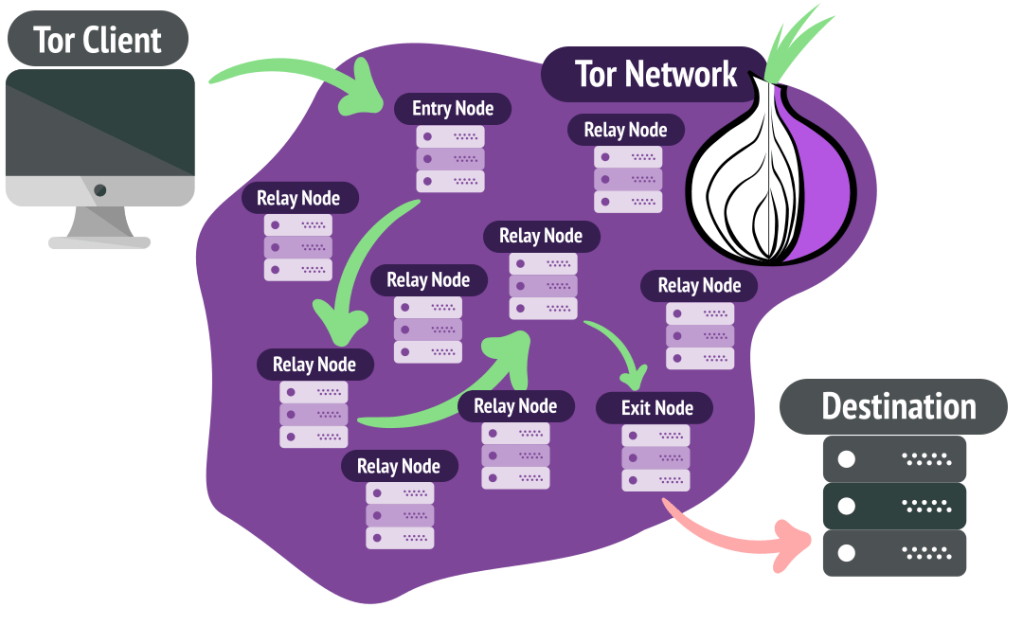
When a user opens a website using Tor, their data is encrypted in multiple layers, like an onion. Each layer is peeled off at a different relay (node).
textCopyEdit[User Data]
   ↓ Encrypted (3 layers)
→ Entry Node (removes outer layer)
→ Middle Node (removes 2nd layer)
→ Exit Node (removes last layer)
→ Internet
✅ 2. Node Types
- Entry Node (Guard Node): Knows your real IP address but not your destination.
- Middle Node: Passes encrypted data along, doesn’t know source or destination.
- Exit Node: Sends decrypted traffic to final destination but doesn’t know origin.
Each node only knows the previous and next hop, never the full route.
✅ 3. Circuit Switching
Tor builds a virtual circuit of 3 nodes for every connection. These circuits are refreshed every 10 minutes to avoid correlation and tracking.
- Uses TLS over TCP
- Circuit setup is handled using Diffie-Hellman Key Exchange
- Packets are sent as fixed-size cells (512 bytes)
✅ 4. Directory Authorities
Tor maintains a list of trusted nodes using Directory Authorities — hardcoded nodes that verify which relays are active and safe. This prevents Sybil attacks from flooding the network with malicious relays.
✅ 5. Bridges (For Censorship Evasion)
In countries where Tor is blocked, users can connect to Bridge Nodes (non-public relays) to bypass deep packet inspection and access Tor stealthily.
🧭 What Does Tor Protect You From?
- ✅ ISP surveillance (they only see you connect to Tor)
- ✅ Government tracking
- ✅ Website fingerprinting
- ✅ IP-based doxxing
- ✅ Advertiser profiling
- ✅ Basic traffic analysis
❌ What Tor Does NOT Protect You From:
- ❌ Malware execution or browser exploits
- ❌ JavaScript-based de-anonymization (unless disabled)
- ❌ Typing identifiable info in forms (OPSEC mistake)
- ❌ Downloading files that connect outside Tor (e.g., PDFs)
🛡️ Real-World Use Cases
| Use Case | Purpose |
|---|---|
| Journalists & Whistleblowers | Bypass censorship, share documents anonymously |
| Human Rights Activists | Protect identity in oppressive regimes |
| Cybersecurity Researchers | Access darknet threat intel sources |
| Pen Testers / Red Teams | Browse targets without attribution |
| Everyday Users | Avoid mass surveillance or targeted ads |
🧪 Threats Against Tor Users
- 🕸 Exit Node Snooping – Unencrypted traffic at the exit node can be sniffed.
- 🐍 Malicious Relays – Attackers may try to control multiple relays to deanonymize users.
- 🧠 Traffic Correlation Attacks – Observing timing & volume at entry/exit points.
🧰 Hardening Your Tor Usage
- 🛑 Disable JavaScript via NoScript extension
- 🔄 Don’t log in to real accounts via Tor (or use burner accounts)
- 🐧 Use Tails OS for maximum anonymity
- ⛔ Avoid downloading files unless sandboxed
- 🕵️♂️ Don’t resize the browser window — keeps you fingerprintable
🔐 Tor vs VPN vs Proxy
| Feature | Tor | VPN | Proxy |
|---|---|---|---|
| Encrypts traffic | ✅ Yes (multi-layer) | ✅ Yes (1 layer) | 🚫 No |
| Hides IP | ✅ Yes | ✅ Yes | ✅ Yes |
| Exit control | ❌ No | ✅ Yes (you choose) | ❌ No |
| Speed | 🐢 Slower | 🚀 Fast | ⚡ Faster |
| Trust Required | ❌ Minimal | ✅ High (VPN logs?) | ✅ High |
🧠 Final Thoughts from CyberDudeBivash
Anonymity is your digital armor in a world of mass surveillance. Tor is a powerful privacy tool — but only when combined with proper operational security (OPSEC) and awareness of its limits.
If you’re a cybersecurity analyst, ethical hacker, or journalist — Tor is your gateway to anonymous research, access, and reporting.
🧩 At CyberDudeBivash, we recommend combining Tor with hardened OS setups like Tails or Whonix, and sandboxed environments for browsing sensitive sites or investigating darknet activity.
📢 Stay Tuned for More
Follow our 3 blogs for daily threat intel, tool breakdowns, and real-world cyber incident analysis:

 Cyberdudebivash
Leave a reply to 🕵️♂️ Anonymity on the Internet: How the Tor Browser WorksBy Bivash Kumar Nayak – Cybersecurity & AI Expert | Co-owner of CyberDudeBivash🔗 cyberdudebivash.com | cyberbivash.blogspot.com – Cyberdudebivash Cancel reply